<?xml version="1.0" encoding="utf-8"?>
<rdf:RDF
    xmlns:rdf="http://www.w3.org/1999/02/22-rdf-syntax-ns#"
    xmlns="http://purl.org/rss/1.0/"
    xmlns:dc="http://purl.org/dc/elements/1.1/"
    xmlns:content="http://purl.org/rss/1.0/modules/content/"
    xmlns:cc="http://web.resource.org/cc/"
    xmlns:foaf="http://xmlns.com/foaf/0.1/"
    xml:lang="ja">

    <channel rdf:about="https://www.mes-ekit.com/?mode=rss">
    <title>電子工作キット、工作部品の通販店　マイクロ電子サービスオンラインショップ</title>
    <link>https://www.mes-ekit.com/</link>
    <description>PICを利用したジオラマ鉄道模型用のキットや電子オルゴールなど、作って楽しめる電子工作キットを販売中！</description>
    <dc:language>ja</dc:language>
    <dc:creator>Color Me Shop!pro</dc:creator>
    <items>
      <rdf:Seq>
        <rdf:li rdf:resource="https://www.mes-ekit.com/?pid=192097199" />
        <rdf:li rdf:resource="https://www.mes-ekit.com/?pid=191879453" />
        <rdf:li rdf:resource="https://www.mes-ekit.com/?pid=191878901" />
        <rdf:li rdf:resource="https://www.mes-ekit.com/?pid=191878553" />
        <rdf:li rdf:resource="https://www.mes-ekit.com/?pid=191864777" />
        <rdf:li rdf:resource="https://www.mes-ekit.com/?pid=186977892" />
        <rdf:li rdf:resource="https://www.mes-ekit.com/?pid=186977769" />
        <rdf:li rdf:resource="https://www.mes-ekit.com/?pid=186967536" />
        <rdf:li rdf:resource="https://www.mes-ekit.com/?pid=186967047" />
        <rdf:li rdf:resource="https://www.mes-ekit.com/?pid=186469610" />
        <rdf:li rdf:resource="https://www.mes-ekit.com/?pid=180402049" />
        <rdf:li rdf:resource="https://www.mes-ekit.com/?pid=176873485" />
        <rdf:li rdf:resource="https://www.mes-ekit.com/?pid=176768971" />
        <rdf:li rdf:resource="https://www.mes-ekit.com/?pid=164926678" />
        <rdf:li rdf:resource="https://www.mes-ekit.com/?pid=157890943" />
      </rdf:Seq>
    </items>
    </channel>

  <item rdf:about="https://www.mes-ekit.com/?pid=192097199">
    <link>https://www.mes-ekit.com/?pid=192097199</link>
    <title>模型用鉄道信号機キット(3灯×2組制御　ATORM用）</title>
    <description>

本キットはATORM DX（鉄道模型自動運転）キットからの制御により、出発信号機、又は場内信号機として動作します。
本キットでは3灯式信号機を2基分点灯させる事が出来ます。出発信号機又は場内信号機をそれぞれ任意にデイップスイッチで設定出来ます。
信号機の割り...</description>
<content:encoded><![CDATA[
<img src="https://img02.shop-pro.jp/PA01128/746/etc_base64/Y2F0Y2hfYmFubmVyMjM.jpg?cmsp_timestamp=20260604191358" style="margin: 0px 0px 5px 0px;" alt=鉄道信号機キット　キャッチ">

<img src="https://img02.shop-pro.jp/PA01128/746/etc_base64/bmV3X3RyX3NpZ25hbF9pbWcyMQ.jpg?cmsp_timestamp=20260604191143" style="margin:0px 0;" />

<div style="margin:10px 0 0 0;clear:both;">
		<p>鉄道模型自動運転キットATORM DX は出発信号機及び場内信号機を合わせて標準で4基分使用しますので、模型用鉄道信号機キットが4セット必要になりますが、本キットを使用すると1セットで３灯式信号機2基分作れるため2セットで済み、大変お得になります。</p>
<p style="margin: 20px 20px 0px 20px; color: red;text-align:left;">※本キットは鉄道模型自動運転キット「ATORM DX1」「ATORM DX2」専用です。他の鉄道信号機キットの閉塞モード、タイマーモードは使用出来ません。</p>
</div>

<div class="free_menu" style="margin:30px 0 25px 0;"><p>本キットの動作</p></div>
<p>信号の現示と点灯パターンの対応</p>

<div style="margin:0 5px;">
<img src="https://img02.shop-pro.jp/PA01128/746/etc_base64/bmV3X3RyX3NpZ25hbF8zLTJpbWc3.jpg?cmsp_timestamp=20260605102327"">
</div>
本キットはATORM DX（鉄道模型自動運転）キットからの制御により、出発信号機、又は場内信号機として動作します。<br>
本キットでは3灯式信号機を2基分点灯させる事が出来ます。出発信号機又は場内信号機をそれぞれ任意にデイップスイッチで設定出来ます。<br>
信号機の割り当てについてはATORM DX の説明書を参照してください。
<br><br>
連動出力から次信号を閉塞モードで繋ぐ事も出来ます。ルートが選択されていない信号機は、単線逆方向と同じ様に繋いでいる全信号が「停止」になります。<br>
連動出力は J81〜J83 側(信号機Ａ)の信号機に続く信号機の1基分です。<br>
ATORM DX2 の同方向で使用する場合は、設定により場内信号1又は場内信号2の開通している方の信号に連動させる事が出来ます。<br>
<img src="https://img02.shop-pro.jp/PA01128/746/etc_base64/bmV3X3RyX3NpZ25hbF8zLTJpbWcx.jpg?cmsp_timestamp=20260605111430""><br>
ATORM DX2 で閉塞信号機を設置する場合は中間駅よりも場内信号機側に設置してください。間に中間駅を挟むと正しく現示しません。

<br style="clear:both;">

<div class="free_menu" style="margin:30px 0 10px 0;"><p>接続例</p></div>
<div style="margin:10px 5px 15px;">

ATORM DX 基板のベル1出力を各信号の連動入力J5又はJ6に接続し、他の信号に図の様にJ5、J6を利用して繋ぎます。
</div>

<img src="https://img02.shop-pro.jp/PA01128/746/etc_base64/bmV3X3RyX3NpZ25hbF8zLTJpbWcy.jpg?cmsp_timestamp=20260605092654">

<br style="clear:both;">
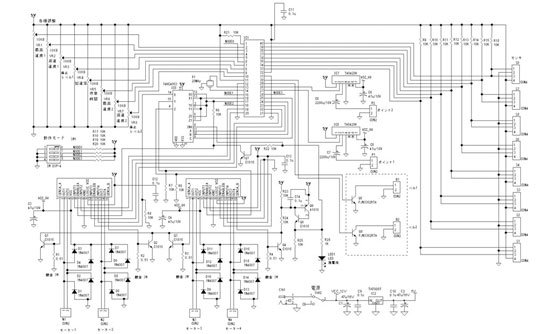
<div class="free_menu" style="margin:30px 0 25px 0;"><p>回路図</p></div>
<div style="margin:0 5px;">
<img src="https://img02.shop-pro.jp/PA01128/746/etc_base64/bmV3X3RyX3NpZ25hbF8zLTJpbWc0.jpg?cmsp_timestamp=20260605100314" alt="新鉄道信号キット（3灯×2）プリント基板（表）" style="float:left;margin-right:10px;">
<img src="https://img02.shop-pro.jp/PA01128/746/etc_base64/bmV3X3RyX3NpZ25hbF8zLTJpbWc1.jpg?cmsp_timestamp=20260605100417" alt="新鉄道信号キット（3灯×2）プリント基板（裏）">
</div>
<br style="clear:both;">
<a href="https://img02.shop-pro.jp/PA01128/746/etc_base64/bmV3X3RyX3NpZ25hbF8zLTJpbWc2TA.jpg?cmsp_timestamp=20260605101141"><img src="https://img02.shop-pro.jp/PA01128/746/etc_base64/bmV3X3RyX3NpZ25hbF8zLTJpbWc2.jpg?cmsp_timestamp=20260605101042" alt="鉄道信号キット（3灯×2）回路図" style="margin-top:20px;"></a>

<br style="clear:both;">

<div class="free_menu" style="margin:30px 0 10px 0;"><p>仕様</p></div>
<table style="border-top:1px solid #ccc;border-left:1px solid #ccc;margin:20px 15px 0;" border="0" cellpadding="0" cellspacing="0">
<tbody><tr>
<th style="border-bottom:1px solid #ccc;border-right:1px solid #ccc;vertical-align:middle;padding:10px;">電源電圧</th>
<td style="border-bottom:1px solid #ccc;border-right:1px solid #ccc;vertical-align:middle;padding:10px;">9V〜12V</td>
</tr>
</tbody></table>
<br>

<table border="0" cellpadding="0" cellspacing="0">
<tbody><tr>
<td style="width: 150px; text-align: center; vertical-align: top;">
<img src="https://img02.shop-pro.jp/PA01128/746/etc/picamp11.jpg?20140403155100" alt="IC3ショート">
</td>
<td style="vertical-align: top;">
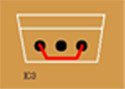
<p style="font-size:1em;font-weight:bold;margin-top:20px;">電池ボックス(単3×3)、ACアダプター(+5V)を使用する場合</p>
<p>U3を実装せず、抵抗などのあまったリード線で配線をして下さい。(左図参照)<br />9〜12Vの電源を使用する場合はU3を実装します。</p>
</td>
</tr>
</tbody></table>

<div class="free_menu" style="margin:30px 0 10px 0;"><p>セット内容</p></div>
<table border="0" cellspacing="0" cellpadding="0" style="margin:20px 15px 0;">
<tr>
<td style="vertical-align:top"><img src="https://img02.shop-pro.jp/PA01128/746/etc_base64/bmV3X3RyX3NpZ25hbF8zLTJpbWcz.jpg?cmsp_timestamp=20260605095137" alt="新鉄道信号キット（3灯×2）セット内容" style="margin-right:10px;">
</td>
<td>
<p>
（1）専用プリント基板… 1枚<br />
（2）鉄道信号制御IC(PIC16F1827) … 1個<br>

（3）IC(TBD62503) … 1個<br>
（4）ICソケット(18ピン) … 1個<br>
（5）フォトカプラ･･･FOD817B×1個<br>
（6）ディップスイッチ … 1個<br>
（7）抵抗 (10KΩ) … 7個<br>
（8）抵抗 (1KΩ) … 1個<br>
（9）抵抗 (330Ω) … 6個<br>
（10）積層セラミックコンデンサ … 1μF × 2個<br>
（11）電解コンデンサ(47μF/35V) ･･･ 1個<br>
（12）LED(赤) 3mm … 2個<br>
（13）LED(黄) 3mm … 2個<br>
（14）LED(緑) 3mm … 2個<br>
（15）チップLED(赤) 1608サイズ … 3個<br>
（16）チップLED(黄) 1608サイズ … 3個<br>
（17）チップLED(緑) 1608サイズ … 3個<br>
（18）線材 … 3m×2<br>
（19）ポリウレタン線（0.12mm） … 1.2m<br>
（20）スイッチ付き電池ボックス（単3×3） … 1個（オプション）<br>
（21）IC（7805） … 1個（オプション）<br>
（22）DCジャック … 1個（ACアダプタセットのみ）<br>
（23）ACアダプタ … 1個（ACアダプタセットのみ）
</p>
</td>
</tr>
</table>


<div class="free_menu" style="margin:30px 0 10px 0;"><p>オプション等</p></div>
<a href="http://www.mes-ekit.com/?mode=f23"><img src="https://img02.shop-pro.jp/PA01128/746/etc/break.gif?20130828110558" style="margin: 10px 0px 0px 0pt;" alt="部品が壊れても一個までなら無料保証！"></a>

<a href="http://www.mes-ekit.com/?mode=f8"><img alt="専用プリント基板だから、回路図が読めなくても作れる！" style="margin: 10px 0px 0px;" src="https://img02.shop-pro.jp/PA01128/746/etc/manual2.gif?20110711103515"/></a>

<a href="http://www.mes-ekit.com/?mode=f9"><img alt="初心者でも大丈夫!はんだごて図解マニュアル付き" style="margin: 10px 0px 0px;" src="https://img02.shop-pro.jp/PA01128/746/etc/manual.gif?20110711103454"/></a>

<a href="http://www.mes-ekit.com/?tid=2&mode=f44"><img src="https://img02.shop-pro.jp/PA01128/746/etc/manual6.gif?cmsp_timestamp=20180112133648" style="margin: 10px 0px 0px 0pt;" alt="チップＬＥＤの配線"></a>

<a href="http://www.mes-ekit.com/?tid=2&mode=f42"><img src="https://img02.shop-pro.jp/PA01128/746/etc/manual5.gif?cmsp_timestamp=20170822153258" style="margin: 10px 0px 0px 0pt;" alt="製作したの動かないときはコチラ"></a>

<div class="free_menu" style="margin:30px 0 10px 0;"><p>ご注文</p></div>
]]></content:encoded>
    <dc:date>2026-06-04T19:03:54+09:00</dc:date>
    <dc:creator>電子工作キット、工作部品の通販店　マイクロ電子サービスオンラインショップ</dc:creator>
    <foaf:topic><foaf:Image rdf:about="https://img02.shop-pro.jp/PA01128/746/product/192097199_th.jpg?cmsp_timestamp=20260604190525" /></foaf:topic>
  </item>

  <item rdf:about="https://www.mes-ekit.com/?pid=191879453">
    <link>https://www.mes-ekit.com/?pid=191879453</link>
    <title>【完成品】鉄道模型自動運転キット ATORM DX2</title>
    <description>

ご注文</description>
<content:encoded><![CDATA[
<img src="https://img02.shop-pro.jp/PA01128/746/etc/atormdx38.jpg?cmsp_timestamp=20160422113454" style="margin: 0px 0px 5px 0px;" alt=鉄道模型自動運転キットATORM DX2"キャッチ>

<img src="https://img02.shop-pro.jp/PA01128/746/etc/atormdx49.jpg?cmsp_timestamp=20160422114418" alt="【完成品】鉄道模型自動運転キット ATORM DX2" style="margin:0px 0;" />

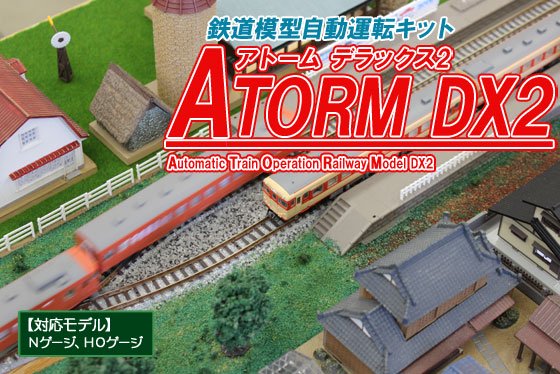
<p>当キットは、鉄道模型自動運転キット『ATORM』のバージョンアップ版、『ATORM DX』の単線ループレイアウト版です。2列車を同時に制御ができ、線路の切り替えポイントの制御もできるようになっていますので、単線で同時に2列車を動かすことができ、使用できるレイアウトの幅が広がります。また最新Verでは、<a href="https://www.mes-ekit.com/?pid=145620810">模型用鉄道信号機キット</a>と連動可能になりました。
</p>

<br>
<strong><span style="font-size:x-large;"><span style="color:#0000FF"><u>鉄道模型自動運転システム　ATORM　とは</u></span></span></strong>
<br>
<p>鉄道模型を自動で制御して走行させる事が出来るシステムです。模型車両を多くコレクションしている方でも気軽に走らせる事が出来る様、車両は市販の標準状態で入線出来ます。DCC等の様な組み込みや改造は不要なので、沢山の車両を保有していても安心です。<br>
・標準状態の車両はNゲージなどのDC12Vで車両に動力のモーター、室内灯、前尾照灯などが装備された車両になります。（最低モーターがあれば運転可能です）
<img src="https://img02.shop-pro.jp/PA01128/746/etc_base64/YXRvcm1fZHhfbmV3MQ.jpg?cmsp_timestamp=20260518144134" alt="">
<br>
<strong><span style="font-size:x-large;"><span style="color:#0000FF"><u>家庭でのレイアウトに丁度良いシステム</u></span></span></strong>
<br>
<p>他社の自動運転システムの様な拡張性はありませんが、鉄道博物館などの巨大なジオラマや集合式レイアウトでもなければ大抵の家庭のレイアウトは駅が2、3程度ではないでしょうか。ATORMは家庭でのレイアウトで扱いやすい様、運転パターンを限定し、設定も簡単にしました。</p>
<br>
<strong><span style="font-size:x-large;"><span style="color:#0000FF"><u>新機能追加　信号機制御に対応</u></span></span></strong>
<br>
<p>模型用鉄道信号機キットと接続し、出発信号機や場内信号機の演出が可能になりました。これにより駅のリアルな情景も再現可能になります。<br>
・信号機を使用する場合は減速センサーの使用を推奨します。よりリアルに動作します。</p>
<img src="https://img02.shop-pro.jp/PA01128/746/etc_base64/YXRvcm1fZHhfbmV3Mg.jpg?cmsp_timestamp=20260518145639" alt="">

<iframe width="560" height="315" src="https://www.youtube.com/embed/KGRKBR1qLkE" title="ATORM DX 信号機連動" frameborder="0" allow="accelerometer; autoplay; clipboard-write; encrypted-media; gyroscope; picture-in-picture; web-share" referrerpolicy="strict-origin-when-cross-origin" allowfullscreen></iframe>
<br><br>

<strong><span style="font-size:x-large;"><span style="color:#0000FF"><u>より使い勝手が良くなる改良点</u></span></span></strong>
<br>
<p>減速センサーから減速して停止センサーで駅に停車する時の減速率を大きくし、停車位置を合わせ易くしました。加速率をゆっくりにすると停車位置がオーバーランする悩みも低減できます。</p>
<img src="https://img02.shop-pro.jp/PA01128/746/etc_base64/YXRvcm1fZHhfbmV3Mw.jpg?cmsp_timestamp=20260518155336" alt="">


<img src="https://img02.shop-pro.jp/PA01128/746/etc/atormdx19.jpg?cmsp_timestamp=20160107094604" alt="商品の特徴" style="margin:5px 0 5px;" />

<img src="https://img02.shop-pro.jp/PA01128/746/etc/atormdx20.jpg?cmsp_timestamp=20160108142533" alt="1.2列車を同時に制御可能に" style="margin: 5px 0pt 5px;" />

<table border="0" cellpadding="0" cellspacing="0">
<tbody><tr>
<td style="width: 150px; text-align: center; vertical-align: top;">
<img src="https://img02.shop-pro.jp/PA01128/746/etc/atormdx16.jpg?cmsp_timestamp=20160106131222" alt="2列車制御" style="margin: 0pt 10px 5px 0pt;" />
</td>
<td style="vertical-align: top;">
<p style="margin: 0pt 10px 0pt 0pt;">弊社の鉄道模型自動運転キット【ATORM】では、1列車のみの制御となっていました。【ATORM　DX2】は2列車の制御が1つのキットで可能になります。また、単線での2列車の運用が可能になりました。お持ちのレイアウトにあった動作パターンをお選びいただき、よりリアルに臨場感あふれるレイアウトに仕上げてみてはいかがでしょうか。</p>
</td>
</tr>
</tbody></table>

<img src="https://img02.shop-pro.jp/PA01128/746/etc/atormdx21.jpg?cmsp_timestamp=20160108142554" alt="2.ポイントを自動で制御" style="margin: 5px 0pt 5px;" />

<table border="0" cellpadding="0" cellspacing="0">
<tbody><tr>
<td style="width: 150px; text-align: center; vertical-align: top;">
<img src="https://img02.shop-pro.jp/PA01128/746/etc/atormdx17.jpg?cmsp_timestamp=20160106131239" alt="ポイントの接続" style="margin: 0pt 10px 5px 0pt;" />
</td>
<td style="vertical-align: top;">
<p style="margin: 0pt 10px 0pt 0pt;">【ATORM　DX2】ではポイントの切り替えを自動で制御できるようになりました。</p>
<br>
<p style="margin: 0pt 10px 0pt 0pt; font-size:95%; color:#f20a0a;">使用できるポイントについて<br>本キットでは2線式のものが使用できます。従来の3線式は使用できません。また、両渡りポイントなど、複数の先端軌条を動かすポイントは対応出来ない場合があります。単独のポイントを使用してください。</p>
</td>
</tr>
</tbody></table>

<br style="clear:both;">

<p style="font-size:1.1em;color:red;font-weight:bold;margin-top:15px;">※完成品はすべて、ご注文後の製作になります。<br>また、銀行振込の場合は入金確認後からの製作開始となります。<br>製作期間は、製作開始から1〜2週間程掛かります。<br>完成品はデリケートな為、配送方法はレターパックプラスではなく<br>ゆうパックをお選びください。</p>


<br style="clear:both;">
<div class="free_menu" style="margin:30px 0 25px 0;"><p>その他の特徴</p></div>

<strong><span style="font-size:x-large;"><span style="color:#0000FF"><u>夜景も再現できます</u></span></span></strong>
<br>
<p>ATORMではLED室内灯を組み込んだ車両を停車中点灯させる事が出来ます。又、夜景に対応出来る車両センサーやハルLEDを組み込んだ建物と合わせる事で夜の鉄道風景を演出可能です。<br>
・TOMIX常点灯、マイクロエース室内灯で点灯。KATOのLED室内灯でも停車中点灯効果があります(明るさの若干の変動はあります)。コアレスモーターの機関車と組み合わせた場合に停車中点灯の効果を発揮出来ない場合があります。</p>
<img src="https://img02.shop-pro.jp/PA01128/746/etc_base64/YXRvcm1fZHhfbmV3NA.jpg?cmsp_timestamp=20260518160809" alt="">
<br><br>
<strong><span style="font-size:x-large;"><span style="color:#0000FF"><u>なりきり発車ベルに接続可能</u></span></span></strong>
<br>
<p>なりきり発車ベルを接続して自動で発車ベルを鳴らす事が可能です。
<br>・発車ベルは運転パターンにより鳴らせる駅が限定されます。又、信号機制御と排他使用となります。
<br><br>
<strong><span style="font-size:x-large;"><span style="color:#0000FF"><u>車両センサーは選択可能</u></span></span></strong>
<br>
<p>Nゲージ、HOゲージなど、様々な条件のレイアウトに使用出来る様、車両センサーは各種選択可能。後付けでCDSセンサー、夜景が再現出来る反射式センサー、TCSセンサーも改造で使えます。一部の運転パターンを除いて、停車センサーを使用しなくても運転可能です。停車位置の精度や予算に合わせて選択可能です。</p>


<br style="clear:both;">
<div class="free_menu" style="margin:30px 0 25px 0;"><p>本キットの動作</p></div>

<div style="margin:5px auto 0;text-align:left;">
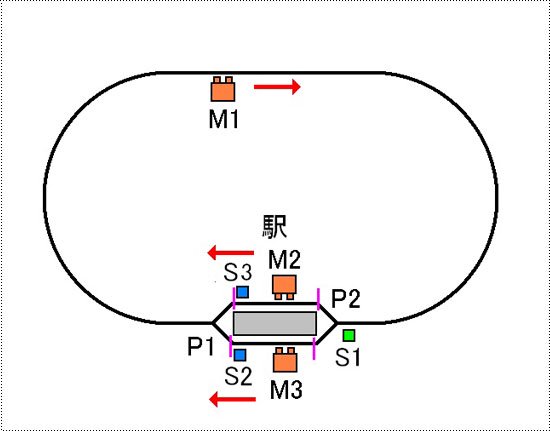
<img src="https://img02.shop-pro.jp/PA01128/746/etc/atormdx42.jpg?cmsp_timestamp=20160127141310" alt="A：1駅ループ 交互発車">
</div>
<div style="margin:25px auto 0;text-align:center;">
<img src="https://img02.shop-pro.jp/PA01128/746/etc/atormdx50.jpg?cmsp_timestamp=20160422114233" alt="Aパターンのイラスト">
</div>
<div style="margin:10px 5px 0;">
<p style="margin-top:10px;">駅からM2側に停車している電車が発車し、ループして駅のM2側に停車します。次にM3側に停車している電車が発車し、ループして駅のM3側に停車します。以上の動作を繰り返します。</p>
</div>
<iframe width="560" height="315" src="https://www.youtube.com/embed/O-sw4CPPLCc" title="ATORM DX2 動作パターン1　1駅ループ　交互発車" frameborder="0" allow="accelerometer; autoplay; clipboard-write; encrypted-media; gyroscope; picture-in-picture; web-share" referrerpolicy="strict-origin-when-cross-origin" allowfullscreen></iframe>

<div style="margin:10px auto 0;text-align:left;">
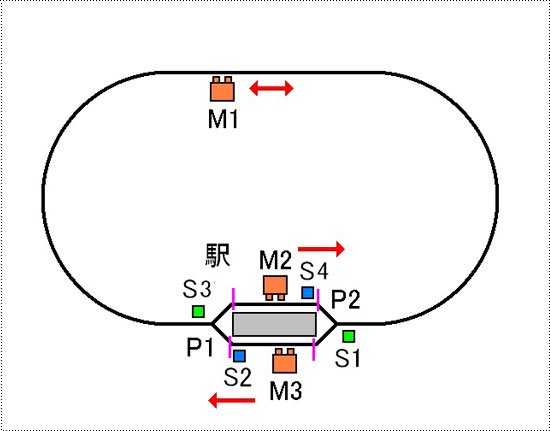
<img src="https://img02.shop-pro.jp/PA01128/746/etc/atormdx43.jpg?cmsp_timestamp=20160127141400" alt="B：1駅ループ 行き違い">
</div>
<div style="margin:25px auto 0;text-align:center;">
<img src="https://img02.shop-pro.jp/PA01128/746/etc/atormdx51.jpg?cmsp_timestamp=20160422114250" alt="Bパターンのイラスト">
</div>
<div style="margin:10px 5px 0;">
<p style="margin-top:20px;">駅からM2側に停車している電車が発車し、右方向にループして駅のM2側に停車します。次にM3側に停車している電車が発車し、M2側とは逆に左方向にループして駅のM3側に停車します。以上の動作を繰り返します。</p>
</div>
<iframe width="560" height="315" src="https://www.youtube.com/embed/zHxnEyKF08A" title="ATORM DX2 動作パターン2　1駅ループ　行き違い" frameborder="0" allow="accelerometer; autoplay; clipboard-write; encrypted-media; gyroscope; picture-in-picture; web-share" referrerpolicy="strict-origin-when-cross-origin" allowfullscreen></iframe>

<div style="margin:10px auto 0;text-align:left;">
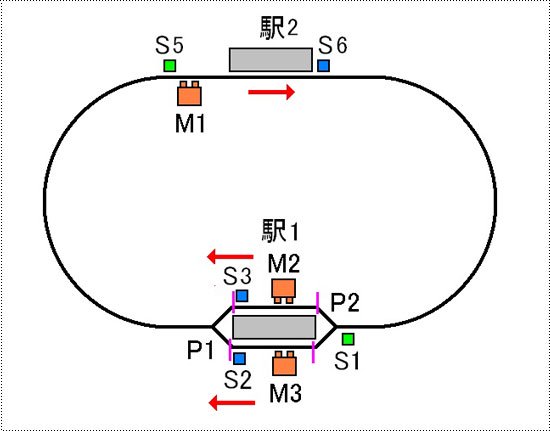
<img src="https://img02.shop-pro.jp/PA01128/746/etc/atormdx44.jpg?cmsp_timestamp=20160127141415" alt="C：1駅ループ 交互発車 中間駅">
</div>
<div style="margin:25px auto 0;text-align:center;">
<img src="https://img02.shop-pro.jp/PA01128/746/etc/atormdx39.jpg?cmsp_timestamp=20160127135550" alt="Cパターンのイラスト">
</div>
<div style="margin:10px 5px 0;">
<p style="margin-top:20px;">駅1からM2側に停車している電車が発車し、ループする途中で駅2に停車します。一定時間停車後して駅1にむかい駅のM2側に停車します。次にM3側に停車している電車が発車し、ループする途中で駅2に停車します。一定時間停車後して駅1にむかい駅のM3側に停車します。以上の動作を繰り返します。</p>
</div>
<iframe width="560" height="315" src="https://www.youtube.com/embed/jkxWH8JRE1w" title="ATORM DX2 動作パターン3　1駅ループ　交互発車　中間駅" frameborder="0" allow="accelerometer; autoplay; clipboard-write; encrypted-media; gyroscope; picture-in-picture; web-share" referrerpolicy="strict-origin-when-cross-origin" allowfullscreen></iframe>

<div style="margin:10px auto 0;text-align:left;">
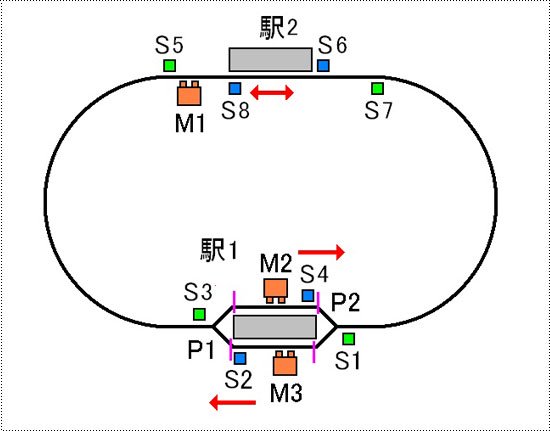
<img src="https://img02.shop-pro.jp/PA01128/746/etc/atormdx45.jpg?cmsp_timestamp=20160127141431" alt="D：1駅ループ 行き違い 中間駅">
</div>
<div style="margin:25px auto 0;text-align:center;">
<img src="https://img02.shop-pro.jp/PA01128/746/etc/atormdx40.jpg?cmsp_timestamp=20160127135609" alt="Dパターンのイラスト">
</div>
<div style="margin:10px 5px 0;">
<p style="margin-top:20px;">駅1からM2側に停車している電車が右方向に発車し、ループする途中で駅2に停車します。一定時間停車後して駅1にむかい駅のM2側に停車します。次にM3側に停車している電車がM2側とは逆に左方向に発車し、ループする途中で駅2に停車します。一定時間停車後して駅1にむかい駅のM3側に停車します。以上の動作を繰り返します。</p>
</div>
<iframe width="560" height="315" src="https://www.youtube.com/embed/kMG7DmHYReA" title="ATORM DX2 動作パターン4　1駅ループ　行き違い　中間駅" frameborder="0" allow="accelerometer; autoplay; clipboard-write; encrypted-media; gyroscope; picture-in-picture; web-share" referrerpolicy="strict-origin-when-cross-origin" allowfullscreen></iframe>


<br style="clear:both;">

<div class="free_menu" style="margin:30px 0 25px 0;"><p>センサーとの接続</p></div>
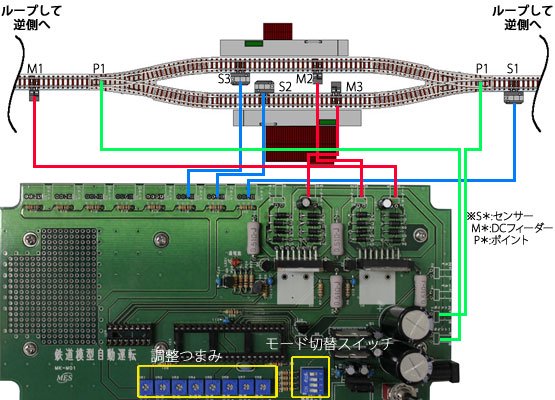
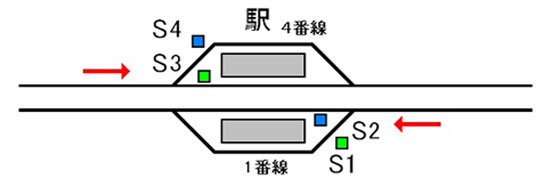
<p>本キットは最大8つのセンサーと4つのDCフィーダー及び2つのポイントを接続して使用します。<br />下図はAパターンの動作に適したセンサーの配線図です。<br />
動作については『本キットの動作』を参照して下さい。<br />
各ポイントと各センサーの位置でタイミングを調整して設置して下さい。</p>
<div style="margin:35px auto 0;text-align:left;">
<img src="https://img02.shop-pro.jp/PA01128/746/etc/autoope25.jpg?202504163728" alt="Aパターンの例">
</div>
<div style="margin:25px auto 0;text-align:center;">
<img src="https://img02.shop-pro.jp/PA01128/746/etc/atormdx41.jpg?cmsp_timestamp=20160127135630" alt="Aパターン配線のイラスト">
</div>

<p style="margin-bottom:20px;">本キットは接点入力(リードスイッチ等)、TCSセンサー又は弊社、車両センサーユニット各種を以下の様に接続して使用します。</p>

<img src="https://img02.shop-pro.jp/PA01128/746/etc/auto_img15.gif?20110809115356" style="float:right;margin:0 0 10px 10px;" />
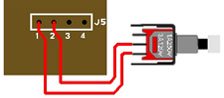
<p style="font-weight:bold;color:#000;">?リードスイッチの場合</p>
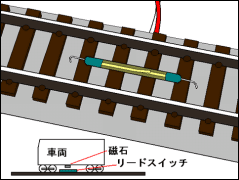
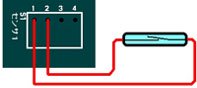
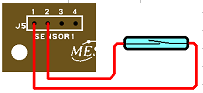
<p>本キットのセンサー1,2の端子にリードスイッチを接続して下さい。<br />リードスイッチを線路に設置し、車両に磁石を取り付ける事で検知します。（右図参照）<br />磁石とリードスイッチの取り付け方向と距離を調整して下さい。</p>
<img src="https://img02.shop-pro.jp/PA01128/746/etc/autoope29.jpg?202505104458" style="margin-top:10px;" />
<br style="clear:both;" />
<img src="https://img02.shop-pro.jp/PA01128/746/etc/auto_img17.gif?20110809135812108" style="float:right;margin:0 0 10px 10px;" />

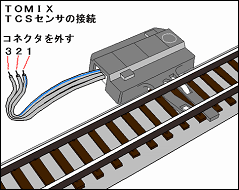
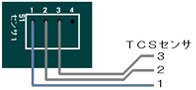
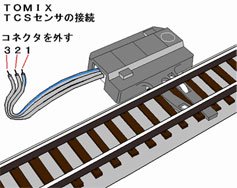
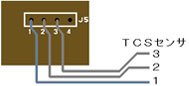
<p style="font-weight:bold;margin-top:20px;color:#000;">?TOMIX TCSセンサーの場合</p>
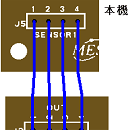
<p>TCSセンサーのケーブルからコネクタを外して先バラにします。（右図参照）<br />本キットのセンサー1,2,3の各端子に右図に対応するケーブルを接続して下さい。<br />尚、本キットではTCSセンサの方向別検知に対応していませんのでセンサーはどちら向きでも良いです。</p>
<img src="https://img02.shop-pro.jp/PA01128/746/etc/autoope28.jpg?202505104108" style="margin-top:10px;" />

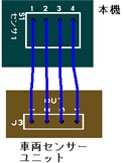
<p style="font-weight:bold;margin-top:20px;color:#000;">?弊社 車両センサーユニット（オプション）の場合</p>
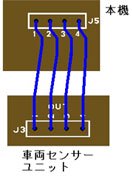
<p>本キットのJ1〜J4の各端子を車両センサーユニット（<a href="https://www.mes-ekit.com/?pid=127642054">CDS式</a>・<a href="https://www.mes-ekit.com/?pid=127645351">軌道回路式</a>・<a href="https://www.mes-ekit.com/?pid=92148338">反射式</a>）のOUT1〜4にそれぞれ接続して下さい（＊反射式はOUT2〜4）。<br />各センサーとの接続は車両センサーユニットの説明書をご覧下さい。</p>
<img src="https://img02.shop-pro.jp/PA01128/746/etc/autoope30.jpg?202505104546" style="margin-top:10px;" />

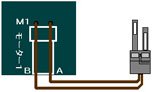
<p style="font-weight:bold;margin-top:20px;color:#000;">?DCフィーダーの接続</p>
<p>本キットのM1〜M4端子にDCフィーダーのコードを接続して下さい。</p>
<img src="https://img02.shop-pro.jp/PA01128/746/etc/autoope31.jpg?202505144740" style="margin-top:10px;" />

<p style="font-weight:bold;margin-top:20px;color:#000;">?ポイントとの接続</p>
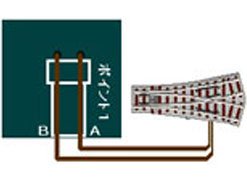
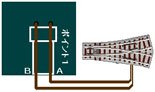
<p>本キットのP1、P2端子にポイントマシンのコードを接続して下さい。</p>
<img src="https://img02.shop-pro.jp/PA01128/746/etc/atormdx9.jpg?cmsp_timestamp=20160105095112" style="margin-top:10px;" />

<br style="clear:both;">
<div class="free_menu" style="margin:30px 0 25px 0;"><p>動作の調整</p></div>

<p style="margin-top:20px;">そなえつけの可変抵抗を調整することにより、停車時間の調整などが出来ます。</p>

<table style="border-top:1px solid #ccc;border-left:1px solid #ccc;margin:20px 15px 0;" border="0" cellpadding="0" cellspacing="0">
<tbody><tr>
<th style="border-bottom:1px solid #ccc;border-right:1px solid #ccc;vertical-align:middle;padding:10px;">VR1・VR6</th>
<td style="border-bottom:1px solid #ccc;border-right:1px solid #ccc;vertical-align:middle;padding:10px;">最高速度</td>
<td style="border-bottom:1px solid #ccc;border-right:1px solid #ccc;vertical-align:middle;padding:10px;">発車後の速度</td>
</tr>
<tr>
<th style="border-bottom:1px solid #ccc;border-right:1px solid #ccc;vertical-align:middle;padding:10px;">VR2・VR7</th>
<td style="border-bottom:1px solid #ccc;border-right:1px solid #ccc;vertical-align:middle;padding:10px;">減速速度</td>
<td style="border-bottom:1px solid #ccc;border-right:1px solid #ccc;vertical-align:middle;padding:10px;">減速センサー通過後の速度</td>
</tr>
<tr>
<th style="border-bottom:1px solid #ccc;border-right:1px solid #ccc;vertical-align:middle;padding:10px;">VR3・VR8</th>
<td style="border-bottom:1px solid #ccc;border-right:1px solid #ccc;vertical-align:middle;padding:10px;">停止レベル</td>
<td style="border-bottom:1px solid #ccc;border-right:1px solid #ccc;vertical-align:middle;padding:10px;">停車中電灯の明るさ</td>
</tr>
<tr>
<th style="border-bottom:1px solid #ccc;border-right:1px solid #ccc;vertical-align:middle;padding:10px;">VR4</th>
<td style="border-bottom:1px solid #ccc;border-right:1px solid #ccc;vertical-align:middle;padding:10px;">加速率</td>
<td style="border-bottom:1px solid #ccc;border-right:1px solid #ccc;vertical-align:middle;padding:10px;">加速・減速の度合い</td>
</tr>
<tr>
<th style="border-bottom:1px solid #ccc;border-right:1px solid #ccc;vertical-align:middle;padding:10px;">VR5</th>
<td style="border-bottom:1px solid #ccc;border-right:1px solid #ccc;vertical-align:middle;padding:10px;">停車時間</td>
<td style="border-bottom:1px solid #ccc;border-right:1px solid #ccc;vertical-align:middle;padding:10px;">駅での停車時間</td>
</tr>
</tbody></table>
<br>

<br style="clear:both;">
<div class="free_menu" style="margin:30px 0 10px 0;"><p>仕様</p></div>
<table style="border-top:1px solid #ccc;border-left:1px solid #ccc;margin:20px 15px 0;" border="0" cellpadding="0" cellspacing="0">
<tbody><tr>
<th style="border-bottom:1px solid #ccc;border-right:1px solid #ccc;vertical-align:middle;padding:10px;">電源電圧</th>
<td style="border-bottom:1px solid #ccc;border-right:1px solid #ccc;vertical-align:middle;padding:10px;">DC12V(ACアダプター内封)</td>
</tr>
</tbody></table>
<br>

<br style="clear:both;">
<div class="free_menu" style="margin:30px 0 25px 0;"><p>回路図</p></div>
<div style="margin:0 5px;">
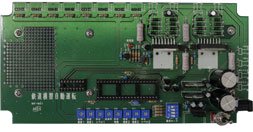
<img src="https://img02.shop-pro.jp/PA01128/746/etc/atormdx11.jpg?cmsp_timestamp=20160105143939" alt="鉄道模型自動運転キットプリント基板（表）" style="float:left;margin-right:10px;">
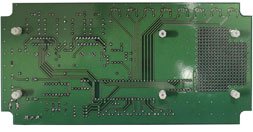
<img src="https://img02.shop-pro.jp/PA01128/746/etc/atormdx12.jpg?cmsp_timestamp=20160105144025" alt="鉄道模型自動運転キットプリント基板（裏）">
</div>
<br style="clear:both;">
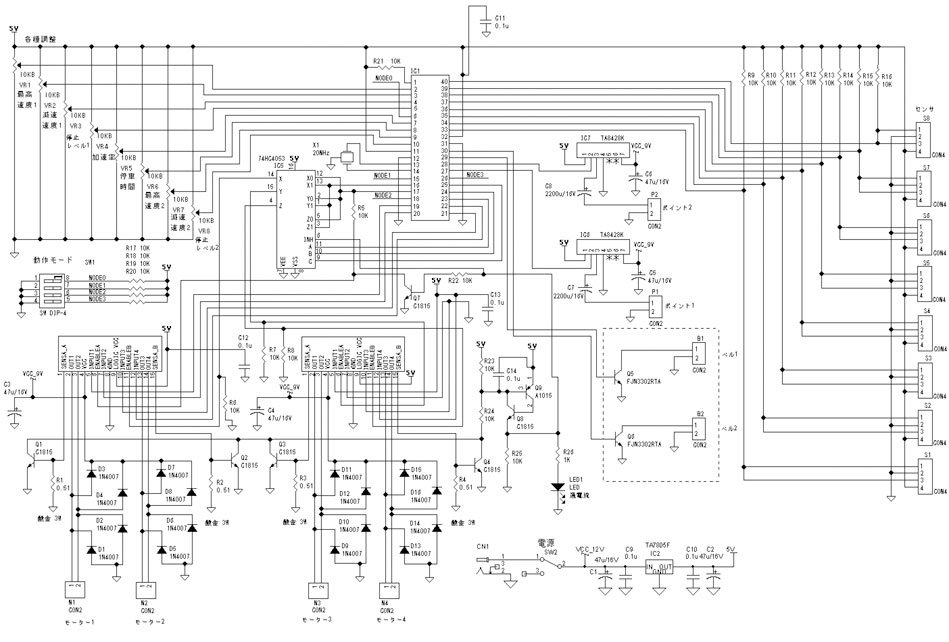
<a href="http://img02.shop-pro.jp/PA01128/746/etc/atormdx13.jpg?cmsp_timestamp=20160105144049"><img src="https://img02.shop-pro.jp/PA01128/746/etc/atormdx14.jpg?cmsp_timestamp=20160105144100" alt="鉄道模型自動運転キット回路図" style="margin-top:10px;"></a>

<br>

<div class="free_menu" style="margin:30px 0 10px 0;"><p>おすすめ商品</p></div>
<a href="http://www.mes-ekit.com/?pid=92148338"><img src="//img02.shop-pro.jp/PA01128/746/etc/reco_img9.jpg?cmsp_timestamp=20160418161512" style="margin: 10px 0px 0px 0px;" alt=車両センサーユニット"></a>

<div class="free_menu" style="margin:30px 0 10px 0;"><p>ご注文</p></div>
]]></content:encoded>
    <dc:date>2026-05-19T10:48:30+09:00</dc:date>
    <dc:creator>電子工作キット、工作部品の通販店　マイクロ電子サービスオンラインショップ</dc:creator>
    <foaf:topic><foaf:Image rdf:about="https://img02.shop-pro.jp/PA01128/746/product/191879453_th.jpg?cmsp_timestamp=20260519113949" /></foaf:topic>
  </item>

  <item rdf:about="https://www.mes-ekit.com/?pid=191878901">
    <link>https://www.mes-ekit.com/?pid=191878901</link>
    <title>鉄道模型自動運転キット ATORM DX2</title>
    <description>

</description>
<content:encoded><![CDATA[
<img src="https://img02.shop-pro.jp/PA01128/746/etc/atormdx38.jpg?cmsp_timestamp=20160422113454" style="margin: 0px 0px 5px 0px;" alt=鉄道模型自動運転キットATORM DX2"キャッチ>

<img src="https://img02.shop-pro.jp/PA01128/746/etc/atormdx48.jpg?cmsp_timestamp=20160422113525" alt="鉄道模型自動運転キット ATORM DX2" style="margin:0px 0;" />

<p>当キットは、鉄道模型自動運転キット『ATORM』のバージョンアップ版、『ATORM DX』の単線ループレイアウト版です。2列車を同時に制御ができ、線路の切り替えポイントの制御もできるようになっていますので、単線で同時に2列車を動かすことができ、使用できるレイアウトの幅が広がります。また最新Verでは、<a href="https://www.mes-ekit.com/?pid=145620810">模型用鉄道信号機キット</a>と連動可能になりました。
</p>

<br>
<strong><span style="font-size:x-large;"><span style="color:#0000FF"><u>鉄道模型自動運転システム　ATORM　とは</u></span></span></strong>
<br>
<p>鉄道模型を自動で制御して走行させる事が出来るシステムです。模型車両を多くコレクションしている方でも気軽に走らせる事が出来る様、車両は市販の標準状態で入線出来ます。DCC等の様な組み込みや改造は不要なので、沢山の車両を保有していても安心です。<br>
・標準状態の車両はNゲージなどのDC12Vで車両に動力のモーター、室内灯、前尾照灯などが装備された車両になります。（最低モーターがあれば運転可能です）
<img src="https://img02.shop-pro.jp/PA01128/746/etc_base64/YXRvcm1fZHhfbmV3MQ.jpg?cmsp_timestamp=20260518144134" alt="">
<br>
<strong><span style="font-size:x-large;"><span style="color:#0000FF"><u>家庭でのレイアウトに丁度良いシステム</u></span></span></strong>
<br>
<p>他社の自動運転システムの様な拡張性はありませんが、鉄道博物館などの巨大なジオラマや集合式レイアウトでもなければ大抵の家庭のレイアウトは駅が2、3程度ではないでしょうか。ATORMは家庭でのレイアウトで扱いやすい様、運転パターンを限定し、設定も簡単にしました。</p>
<br>
<strong><span style="font-size:x-large;"><span style="color:#0000FF"><u>新機能追加　信号機制御に対応</u></span></span></strong>
<br>
<p>模型用鉄道信号機キットと接続し、出発信号機や場内信号機の演出が可能になりました。これにより駅のリアルな情景も再現可能になります。<br>
・信号機を使用する場合は減速センサーの使用を推奨します。よりリアルに動作します。</p>
<img src="https://img02.shop-pro.jp/PA01128/746/etc_base64/YXRvcm1fZHhfbmV3Mg.jpg?cmsp_timestamp=20260518145639" alt="">

<iframe width="560" height="315" src="https://www.youtube.com/embed/KGRKBR1qLkE" title="ATORM DX 信号機連動" frameborder="0" allow="accelerometer; autoplay; clipboard-write; encrypted-media; gyroscope; picture-in-picture; web-share" referrerpolicy="strict-origin-when-cross-origin" allowfullscreen></iframe>
<br><br>

<strong><span style="font-size:x-large;"><span style="color:#0000FF"><u>より使い勝手が良くなる改良点</u></span></span></strong>
<br>
<p>減速センサーから減速して停止センサーで駅に停車する時の減速率を大きくし、停車位置を合わせ易くしました。加速率をゆっくりにすると停車位置がオーバーランする悩みも低減できます。</p>
<img src="https://img02.shop-pro.jp/PA01128/746/etc_base64/YXRvcm1fZHhfbmV3Mw.jpg?cmsp_timestamp=20260518155336" alt="">


<img src="https://img02.shop-pro.jp/PA01128/746/etc/atormdx19.jpg?cmsp_timestamp=20160107094604" alt="商品の特徴" style="margin:5px 0 5px;" />

<img src="https://img02.shop-pro.jp/PA01128/746/etc/atormdx20.jpg?cmsp_timestamp=20160108142533" alt="1.2列車を同時に制御可能に" style="margin: 5px 0pt 5px;" />

<table border="0" cellpadding="0" cellspacing="0">
<tbody><tr>
<td style="width: 150px; text-align: center; vertical-align: top;">
<img src="https://img02.shop-pro.jp/PA01128/746/etc/atormdx16.jpg?cmsp_timestamp=20160106131222" alt="2列車制御" style="margin: 0pt 10px 5px 0pt;" />
</td>
<td style="vertical-align: top;">
<p style="margin: 0pt 10px 0pt 0pt;">弊社の鉄道模型自動運転キット【ATORM】では、1列車のみの制御となっていました。【ATORM　DX2】は2列車の制御が1つのキットで可能になります。また、単線での2列車の運用が可能になりました。お持ちのレイアウトにあった動作パターンをお選びいただき、よりリアルに臨場感あふれるレイアウトに仕上げてみてはいかがでしょうか。</p>
</td>
</tr>
</tbody></table>

<img src="https://img02.shop-pro.jp/PA01128/746/etc/atormdx21.jpg?cmsp_timestamp=20160108142554" alt="2.ポイントを自動で制御" style="margin: 5px 0pt 5px;" />

<table border="0" cellpadding="0" cellspacing="0">
<tbody><tr>
<td style="width: 150px; text-align: center; vertical-align: top;">
<img src="https://img02.shop-pro.jp/PA01128/746/etc/atormdx17.jpg?cmsp_timestamp=20160106131239" alt="ポイントの接続" style="margin: 0pt 10px 5px 0pt;" />
</td>
<td style="vertical-align: top;">
<p style="margin: 0pt 10px 0pt 0pt;">【ATORM　DX2】ではポイントの切り替えを自動で制御できるようになりました。</p>
<br>
<p style="margin: 0pt 10px 0pt 0pt; font-size:95%; color:#f20a0a;">使用できるポイントについて<br>本キットでは2線式のものが使用できます。従来の3線式は使用できません。また、両渡りポイントなど、複数の先端軌条を動かすポイントは対応出来ない場合があります。単独のポイントを使用してください。</p>
</td>
</tr>
</tbody></table>

<br style="clear:both;">
<div class="free_menu" style="margin:30px 0 25px 0;"><p>その他の特徴</p></div>

<strong><span style="font-size:x-large;"><span style="color:#0000FF"><u>夜景も再現できます</u></span></span></strong>
<br>
<p>ATORMではLED室内灯を組み込んだ車両を停車中点灯させる事が出来ます。又、夜景に対応出来る車両センサーやハルLEDを組み込んだ建物と合わせる事で夜の鉄道風景を演出可能です。<br>
・TOMIX常点灯、マイクロエース室内灯で点灯。KATOのLED室内灯でも停車中点灯効果があります(明るさの若干の変動はあります)。コアレスモーターの機関車と組み合わせた場合に停車中点灯の効果を発揮出来ない場合があります。</p>
<img src="https://img02.shop-pro.jp/PA01128/746/etc_base64/YXRvcm1fZHhfbmV3NA.jpg?cmsp_timestamp=20260518160809" alt="">
<br><br>
<strong><span style="font-size:x-large;"><span style="color:#0000FF"><u>なりきり発車ベルに接続可能</u></span></span></strong>
<br>
<p>なりきり発車ベルを接続して自動で発車ベルを鳴らす事が可能です。
<br>・発車ベルは運転パターンにより鳴らせる駅が限定されます。又、信号機制御と排他使用となります。
<br><br>
<strong><span style="font-size:x-large;"><span style="color:#0000FF"><u>車両センサーは選択可能</u></span></span></strong>
<br>
<p>Nゲージ、HOゲージなど、様々な条件のレイアウトに使用出来る様、車両センサーは各種選択可能。後付けでCDSセンサー、夜景が再現出来る反射式センサー、TCSセンサーも改造で使えます。一部の運転パターンを除いて、停車センサーを使用しなくても運転可能です。停車位置の精度や予算に合わせて選択可能です。</p>


<br style="clear:both;">
<div class="free_menu" style="margin:30px 0 25px 0;"><p>本キットの動作</p></div>

<div style="margin:5px auto 0;text-align:left;">
<img src="https://img02.shop-pro.jp/PA01128/746/etc/atormdx42.jpg?cmsp_timestamp=20160127141310" alt="A：1駅ループ 交互発車">
</div>
<div style="margin:25px auto 0;text-align:center;">
<img src="https://img02.shop-pro.jp/PA01128/746/etc/atormdx50.jpg?cmsp_timestamp=20160422114233" alt="Aパターンのイラスト">
</div>
<div style="margin:10px 5px 0;">
<p style="margin-top:10px;">駅からM2側に停車している電車が発車し、ループして駅のM2側に停車します。次にM3側に停車している電車が発車し、ループして駅のM3側に停車します。以上の動作を繰り返します。</p>
</div>
<iframe width="560" height="315" src="https://www.youtube.com/embed/O-sw4CPPLCc" title="ATORM DX2 動作パターン1　1駅ループ　交互発車" frameborder="0" allow="accelerometer; autoplay; clipboard-write; encrypted-media; gyroscope; picture-in-picture; web-share" referrerpolicy="strict-origin-when-cross-origin" allowfullscreen></iframe>

<div style="margin:10px auto 0;text-align:left;">
<img src="https://img02.shop-pro.jp/PA01128/746/etc/atormdx43.jpg?cmsp_timestamp=20160127141400" alt="B：1駅ループ 行き違い">
</div>
<div style="margin:25px auto 0;text-align:center;">
<img src="https://img02.shop-pro.jp/PA01128/746/etc/atormdx51.jpg?cmsp_timestamp=20160422114250" alt="Bパターンのイラスト">
</div>
<div style="margin:10px 5px 0;">
<p style="margin-top:20px;">駅からM2側に停車している電車が発車し、右方向にループして駅のM2側に停車します。次にM3側に停車している電車が発車し、M2側とは逆に左方向にループして駅のM3側に停車します。以上の動作を繰り返します。</p>
</div>
<iframe width="560" height="315" src="https://www.youtube.com/embed/zHxnEyKF08A" title="ATORM DX2 動作パターン2　1駅ループ　行き違い" frameborder="0" allow="accelerometer; autoplay; clipboard-write; encrypted-media; gyroscope; picture-in-picture; web-share" referrerpolicy="strict-origin-when-cross-origin" allowfullscreen></iframe>

<div style="margin:10px auto 0;text-align:left;">
<img src="https://img02.shop-pro.jp/PA01128/746/etc/atormdx44.jpg?cmsp_timestamp=20160127141415" alt="C：1駅ループ 交互発車 中間駅">
</div>
<div style="margin:25px auto 0;text-align:center;">
<img src="https://img02.shop-pro.jp/PA01128/746/etc/atormdx39.jpg?cmsp_timestamp=20160127135550" alt="Cパターンのイラスト">
</div>
<div style="margin:10px 5px 0;">
<p style="margin-top:20px;">駅1からM2側に停車している電車が発車し、ループする途中で駅2に停車します。一定時間停車後して駅1にむかい駅のM2側に停車します。次にM3側に停車している電車が発車し、ループする途中で駅2に停車します。一定時間停車後して駅1にむかい駅のM3側に停車します。以上の動作を繰り返します。</p>
</div>
<iframe width="560" height="315" src="https://www.youtube.com/embed/jkxWH8JRE1w" title="ATORM DX2 動作パターン3　1駅ループ　交互発車　中間駅" frameborder="0" allow="accelerometer; autoplay; clipboard-write; encrypted-media; gyroscope; picture-in-picture; web-share" referrerpolicy="strict-origin-when-cross-origin" allowfullscreen></iframe>

<div style="margin:10px auto 0;text-align:left;">
<img src="https://img02.shop-pro.jp/PA01128/746/etc/atormdx45.jpg?cmsp_timestamp=20160127141431" alt="D：1駅ループ 行き違い 中間駅">
</div>
<div style="margin:25px auto 0;text-align:center;">
<img src="https://img02.shop-pro.jp/PA01128/746/etc/atormdx40.jpg?cmsp_timestamp=20160127135609" alt="Dパターンのイラスト">
</div>
<div style="margin:10px 5px 0;">
<p style="margin-top:20px;">駅1からM2側に停車している電車が右方向に発車し、ループする途中で駅2に停車します。一定時間停車後して駅1にむかい駅のM2側に停車します。次にM3側に停車している電車がM2側とは逆に左方向に発車し、ループする途中で駅2に停車します。一定時間停車後して駅1にむかい駅のM3側に停車します。以上の動作を繰り返します。</p>
</div>
<iframe width="560" height="315" src="https://www.youtube.com/embed/kMG7DmHYReA" title="ATORM DX2 動作パターン4　1駅ループ　行き違い　中間駅" frameborder="0" allow="accelerometer; autoplay; clipboard-write; encrypted-media; gyroscope; picture-in-picture; web-share" referrerpolicy="strict-origin-when-cross-origin" allowfullscreen></iframe>


<br style="clear:both;">

<div class="free_menu" style="margin:30px 0 25px 0;"><p>センサーとの接続</p></div>
<p>本キットは最大8つのセンサーと4つのDCフィーダー及び2つのポイントを接続して使用します。<br />下図はAパターンの動作に適したセンサーの配線図です。<br />
動作については『本キットの動作』を参照して下さい。<br />
各ポイントと各センサーの位置でタイミングを調整して設置して下さい。</p>
<div style="margin:35px auto 0;text-align:left;">
<img src="https://img02.shop-pro.jp/PA01128/746/etc/autoope25.jpg?202504163728" alt="Aパターンの例">
</div>
<div style="margin:25px auto 0;text-align:center;">
<img src="https://img02.shop-pro.jp/PA01128/746/etc/atormdx41.jpg?cmsp_timestamp=20160127135630" alt="Aパターン配線のイラスト">
</div>

<p style="margin-bottom:20px;">本キットは接点入力(リードスイッチ等)、TCSセンサー又は弊社、車両センサーユニット各種を以下の様に接続して使用します。</p>

<img src="https://img02.shop-pro.jp/PA01128/746/etc/auto_img15.gif?20110809115356" style="float:right;margin:0 0 10px 10px;" />
<p style="font-weight:bold;color:#000;">?リードスイッチの場合</p>
<p>本キットのセンサー1,2の端子にリードスイッチを接続して下さい。<br />リードスイッチを線路に設置し、車両に磁石を取り付ける事で検知します。（右図参照）<br />磁石とリードスイッチの取り付け方向と距離を調整して下さい。</p>
<img src="https://img02.shop-pro.jp/PA01128/746/etc/autoope29.jpg?202505104458" style="margin-top:10px;" />
<br style="clear:both;" />
<img src="https://img02.shop-pro.jp/PA01128/746/etc/auto_img17.gif?20110809135812108" style="float:right;margin:0 0 10px 10px;" />

<p style="font-weight:bold;margin-top:20px;color:#000;">?TOMIX TCSセンサーの場合</p>
<p>TCSセンサーのケーブルからコネクタを外して先バラにします。（右図参照）<br />本キットのセンサー1,2,3の各端子に右図に対応するケーブルを接続して下さい。<br />尚、本キットではTCSセンサの方向別検知に対応していませんのでセンサーはどちら向きでも良いです。</p>
<img src="https://img02.shop-pro.jp/PA01128/746/etc/autoope28.jpg?202505104108" style="margin-top:10px;" />

<p style="font-weight:bold;margin-top:20px;color:#000;">?弊社 車両センサーユニット（オプション）の場合</p>
<p>本キットのJ1〜J4の各端子を車両センサーユニット（<a href="https://www.mes-ekit.com/?pid=127642054">CDS式</a>・<a href="https://www.mes-ekit.com/?pid=127645351">軌道回路式</a>・<a href="https://www.mes-ekit.com/?pid=92148338">反射式</a>）のOUT1〜4にそれぞれ接続して下さい（＊反射式はOUT2〜4）。<br />各センサーとの接続は車両センサーユニットの説明書をご覧下さい。</p>
<img src="https://img02.shop-pro.jp/PA01128/746/etc/autoope30.jpg?202505104546" style="margin-top:10px;" />

<p style="font-weight:bold;margin-top:20px;color:#000;">?DCフィーダーの接続</p>
<p>本キットのM1〜M4端子にDCフィーダーのコードを接続して下さい。</p>
<img src="https://img02.shop-pro.jp/PA01128/746/etc/autoope31.jpg?202505144740" style="margin-top:10px;" />

<p style="font-weight:bold;margin-top:20px;color:#000;">?ポイントとの接続</p>
<p>本キットのP1、P2端子にポイントマシンのコードを接続して下さい。</p>
<img src="https://img02.shop-pro.jp/PA01128/746/etc/atormdx9.jpg?cmsp_timestamp=20160105095112" style="margin-top:10px;" />

<br style="clear:both;">
<div class="free_menu" style="margin:30px 0 25px 0;"><p>動作の調整</p></div>

<p style="margin-top:20px;">そなえつけの可変抵抗を調整することにより、停車時間の調整などが出来ます。</p>

<table style="border-top:1px solid #ccc;border-left:1px solid #ccc;margin:20px 15px 0;" border="0" cellpadding="0" cellspacing="0">
<tbody><tr>
<th style="border-bottom:1px solid #ccc;border-right:1px solid #ccc;vertical-align:middle;padding:10px;">VR1・VR6</th>
<td style="border-bottom:1px solid #ccc;border-right:1px solid #ccc;vertical-align:middle;padding:10px;">最高速度</td>
<td style="border-bottom:1px solid #ccc;border-right:1px solid #ccc;vertical-align:middle;padding:10px;">発車後の速度</td>
</tr>
<tr>
<th style="border-bottom:1px solid #ccc;border-right:1px solid #ccc;vertical-align:middle;padding:10px;">VR2・VR7</th>
<td style="border-bottom:1px solid #ccc;border-right:1px solid #ccc;vertical-align:middle;padding:10px;">減速速度</td>
<td style="border-bottom:1px solid #ccc;border-right:1px solid #ccc;vertical-align:middle;padding:10px;">減速センサー通過後の速度</td>
</tr>
<tr>
<th style="border-bottom:1px solid #ccc;border-right:1px solid #ccc;vertical-align:middle;padding:10px;">VR3・VR8</th>
<td style="border-bottom:1px solid #ccc;border-right:1px solid #ccc;vertical-align:middle;padding:10px;">停止レベル</td>
<td style="border-bottom:1px solid #ccc;border-right:1px solid #ccc;vertical-align:middle;padding:10px;">停車中電灯の明るさ</td>
</tr>
<tr>
<th style="border-bottom:1px solid #ccc;border-right:1px solid #ccc;vertical-align:middle;padding:10px;">VR4</th>
<td style="border-bottom:1px solid #ccc;border-right:1px solid #ccc;vertical-align:middle;padding:10px;">加速率</td>
<td style="border-bottom:1px solid #ccc;border-right:1px solid #ccc;vertical-align:middle;padding:10px;">加速・減速の度合い</td>
</tr>
<tr>
<th style="border-bottom:1px solid #ccc;border-right:1px solid #ccc;vertical-align:middle;padding:10px;">VR5</th>
<td style="border-bottom:1px solid #ccc;border-right:1px solid #ccc;vertical-align:middle;padding:10px;">停車時間</td>
<td style="border-bottom:1px solid #ccc;border-right:1px solid #ccc;vertical-align:middle;padding:10px;">駅での停車時間</td>
</tr>
</tbody></table>
<br>

<br style="clear:both;">
<div class="free_menu" style="margin:30px 0 10px 0;"><p>仕様</p></div>
<table style="border-top:1px solid #ccc;border-left:1px solid #ccc;margin:20px 15px 0;" border="0" cellpadding="0" cellspacing="0">
<tbody><tr>
<th style="border-bottom:1px solid #ccc;border-right:1px solid #ccc;vertical-align:middle;padding:10px;">電源電圧</th>
<td style="border-bottom:1px solid #ccc;border-right:1px solid #ccc;vertical-align:middle;padding:10px;">DC12V(ACアダプター内封)</td>
</tr>
</tbody></table>
<br>

<br style="clear:both;">
<div class="free_menu" style="margin:30px 0 25px 0;"><p>回路図</p></div>
<div style="margin:0 5px;">
<img src="https://img02.shop-pro.jp/PA01128/746/etc/atormdx11.jpg?cmsp_timestamp=20160105143939" alt="鉄道模型自動運転キットプリント基板（表）" style="float:left;margin-right:10px;">
<img src="https://img02.shop-pro.jp/PA01128/746/etc/atormdx12.jpg?cmsp_timestamp=20160105144025" alt="鉄道模型自動運転キットプリント基板（裏）">
</div>
<br style="clear:both;">
<a href="http://img02.shop-pro.jp/PA01128/746/etc/atormdx13.jpg?cmsp_timestamp=20160105144049"><img src="https://img02.shop-pro.jp/PA01128/746/etc/atormdx14.jpg?cmsp_timestamp=20160105144100" alt="鉄道模型自動運転キット回路図" style="margin-top:10px;"></a>

<div class="free_menu" style="margin:30px 0 10px 0;"><p>セット内容</p></div>
<table border="0" cellspacing="0" cellpadding="0" style="margin:20px 15px 0;">
<tr>
<td style="vertical-align:top"><img src="https://img02.shop-pro.jp/PA01128/746/etc/atormdx15.jpg?cmsp_timestamp=20160105145158" alt="鉄道模型自動運転キットセット内容" style="margin-right:10px;">
</td>
<td>
<p>
（1）専用プリント基板 … 1枚<br>
（2）制御IC (PIC16F18877) … 1個<br>
（3）ICソケット（40ピン）…1個<br>
（4）IC (74HC4053) … 1個<br>
（5）ICソケット（16ピン）… 1個<br>
（6）IC (L298N) … 2個<br>
（7）IC (TA8428K) … 1個<br>
（8）IC (7805) … 1個<br>
（9）トランジスタ (2SA1015) … 1個<br>
（10）トランジスタ (2SC1815) … 6個<br>
（11）抵抗内臓トランジスタ (FJN3302) … 1個<br>
（12）セラミックレゾネータ（20MHz） … 1個<br>
（13）抵抗 (10KΩ) … 21個<br>
（14）抵抗 (1KΩ) … 1個<br>
（15）酸金抵抗 (0.51Ω) … 4個<br>
（16）可変抵抗 (10KΩB) … 8個<br>
（17）ディップスイッチ … 1個<br>
（18）ダイオード … 16個<br>
（19）積層セラミックコンデンサ (0.1μF) … 6個<br>
（20）電解コンデンサ（2200μF） … 2個<br>
（21）電解コンデンサ（22〜47μF） … 6個<br>
（22）LED(赤)3mm … 1個<br>
（23）DCジャック … 1個<br>
（24）トグルスイッチ … 1個<br>
（25）なべビス（M3×6） … 6個<br>
（26）スペーサ … 6個<br>
（27）ACアダプター（DC12V） … 1個<br>
</p>
</td>
</tr>
</table>

<div class="free_menu" style="margin:30px 0 10px 0;"><p>オプション等</p></div>
<a href="http://www.mes-ekit.com/?mode=f23"><img src="https://img02.shop-pro.jp/PA01128/746/etc/break.gif?20130828110558" style="margin: 20px 0px 0px 0pt;" alt="部品が壊れても一個までなら無料保証！"></a>

<a href="http://www.mes-ekit.com/?mode=f8"><img alt="専用プリント基板だから、回路図が読めなくても作れる！" style="margin: 10px 0px 0px;" src="http://img02.shop-

pro.jp/PA01128/746/etc/manual2.gif?20110711103515"/></a>

<a href="http://www.mes-ekit.com/?mode=f9"><img alt="初心者でも大丈夫!はんだごて図解マニュアル付き" style="margin: 10px 0px 0px;" src="https://img02.shop-pro.jp/PA01128/746/etc/manual.gif?20110711103454"/></a>

<a href="http://www.mes-ekit.com/?tid=2&mode=f42"><img src="https://img02.shop-pro.jp/PA01128/746/etc/manual5.gif?cmsp_timestamp=20170822153258" style="margin: 10px 0px 0px 0pt;" alt="製作したの動かないときはコチラ"></a>

<a href="http://www.mes-ekit.com/?pid=92148338"><img src="https://img02.shop-pro.jp/PA01128/746/etc/reco_img9.jpg?cmsp_timestamp=20160418161512" style="margin: 10px 0px 0px 0px;" alt=車両センサーユニット(反射式)"></a>

<a href="https://www.mes-ekit.com/?pid=191879453"><img src="https://img02.shop-pro.jp/PA01128/746/etc/reco_img15.jpg?cmsp_timestamp=20160419170734" style="margin: 10px 0px 0px 0px;" alt=【完成品】鉄道模型自動運転キットATORM DX2"></a>

<a href="https://www.mes-ekit.com/?pid=191864777"><img src="https://img02.shop-pro.jp/PA01128/746/etc/reco_img1.jpg?cmsp_timestamp=20160418162102" style="margin: 10px 0px 0px 0px;" alt="鉄道模型自動運転キット ATORM DX1"></a>

<div class="free_menu" style="margin:30px 0 10px 0;"><p>ご注文</p></div>
]]></content:encoded>
    <dc:date>2026-05-19T09:58:43+09:00</dc:date>
    <dc:creator>電子工作キット、工作部品の通販店　マイクロ電子サービスオンラインショップ</dc:creator>
    <foaf:topic><foaf:Image rdf:about="https://img02.shop-pro.jp/PA01128/746/product/191878901_th.jpg?cmsp_timestamp=20260519113632" /></foaf:topic>
  </item>

  <item rdf:about="https://www.mes-ekit.com/?pid=191878553">
    <link>https://www.mes-ekit.com/?pid=191878553</link>
    <title>【完成品】鉄道模型自動運転キット ATORM DX1</title>
    <description>

ご注文</description>
<content:encoded><![CDATA[
<img src="https://img02.shop-pro.jp/PA01128/746/etc/atormdx37.jpg?cmsp_timestamp=20160422114635" style="margin: 0px 0px 5px 0px;" alt=鉄道模型自動運転キットATORM DX1"キャッチ>

<img src="https://img02.shop-pro.jp/PA01128/746/etc/atormdx47.jpg?cmsp_timestamp=20160422114657" alt="鉄道模型自動運転キット ATORM DX1【完成品】" style="margin:0px 0;" />

<p>当キットは、鉄道模型自動運転キット『ATORM』のバージョンアップ版です。2列車を同時に制御ができ、線路の切り替えポイントの制御もできるようになっていますので、単線で同時に2列車を動かすことができ、使用できるレイアウトの幅が広がります。</p>
また最新Verでは、<a href="https://www.mes-ekit.com/?pid=145620810">模型用鉄道信号機キット</a>と連動可能になりました。
</p>

<br>
<strong><span style="font-size:x-large;"><span style="color:#0000FF"><u>鉄道模型自動運転システム　ATORM　とは</u></span></span></strong>
<br>
<p>鉄道模型を自動で制御して走行させる事が出来るシステムです。模型車両を多くコレクションしている方でも気軽に走らせる事が出来る様、車両は市販の標準状態で入線出来ます。DCC等の様な組み込みや改造は不要なので、沢山の車両を保有していても安心です。<br>
・標準状態の車両はNゲージなどのDC12Vで車両に動力のモーター、室内灯、前尾照灯などが装備された車両になります。（最低モーターがあれば運転可能です）
<img src="https://img02.shop-pro.jp/PA01128/746/etc_base64/YXRvcm1fZHhfbmV3MQ.jpg?cmsp_timestamp=20260518144134" alt="">
<br>
<strong><span style="font-size:x-large;"><span style="color:#0000FF"><u>家庭でのレイアウトに丁度良いシステム</u></span></span></strong>
<br>
<p>他社の自動運転システムの様な拡張性はありませんが、鉄道博物館などの巨大なジオラマや集合式レイアウトでもなければ大抵の家庭のレイアウトは駅が2、3程度ではないでしょうか。ATORMは家庭でのレイアウトで扱いやすい様、運転パターンを限定し、設定も簡単にしました。</p>
<br>
<strong><span style="font-size:x-large;"><span style="color:#0000FF"><u>新機能追加　信号機制御に対応</u></span></span></strong>
<br>
<p>模型用鉄道信号機キットと接続し、出発信号機や場内信号機の演出が可能になりました。これにより駅のリアルな情景も再現可能になります。<br>
・信号機を使用する場合は減速センサーの使用を推奨します。よりリアルに動作します。</p>
<img src="https://img02.shop-pro.jp/PA01128/746/etc_base64/YXRvcm1fZHhfbmV3Mg.jpg?cmsp_timestamp=20260518145639" alt="">

<iframe width="560" height="315" src="https://www.youtube.com/embed/KGRKBR1qLkE" title="ATORM DX 信号機連動" frameborder="0" allow="accelerometer; autoplay; clipboard-write; encrypted-media; gyroscope; picture-in-picture; web-share" referrerpolicy="strict-origin-when-cross-origin" allowfullscreen></iframe>
<br><br>

<strong><span style="font-size:x-large;"><span style="color:#0000FF"><u>より使い勝手が良くなる改良点</u></span></span></strong>
<br>
<p>減速センサーから減速して停止センサーで駅に停車する時の減速率を大きくし、停車位置を合わせ易くしました。加速率をゆっくりにすると停車位置がオーバーランする悩みも低減できます。</p>
<img src="https://img02.shop-pro.jp/PA01128/746/etc_base64/YXRvcm1fZHhfbmV3Mw.jpg?cmsp_timestamp=20260518155336" alt="">


<img src="https://img02.shop-pro.jp/PA01128/746/etc/atormdx19.jpg?cmsp_timestamp=20160107094604" alt="商品の特徴" style="margin:5px 0 5px;" />

<img src="https://img02.shop-pro.jp/PA01128/746/etc/atormdx20.jpg?cmsp_timestamp=20160108142533" alt="1.2列車を同時に制御可能に" style="margin: 5px 0pt 5px;" />

<table border="0" cellpadding="0" cellspacing="0">
<tbody><tr>
<td style="width: 150px; text-align: center; vertical-align: top;">
<img src="https://img02.shop-pro.jp/PA01128/746/etc/atormdx16.jpg?cmsp_timestamp=20160106131222" alt="2列車制御" style="margin: 0pt 10px 5px 0pt;" />
</td>
<td style="vertical-align: top;">
<p style="margin: 0pt 10px 0pt 0pt;">弊社の鉄道模型自動運転キット【ATORM】では、1列車のみの制御となっていました。【ATORM　DX1】は2列車の制御が1つのキットで可能になります。また、単線での2列車の運用が可能になりました。お持ちのレイアウトにあった動作パターンをお選びいただき、よりリアルに臨場感あふれるレイアウトに仕上げてみてはいかがでしょうか。</p>
</td>
</tr>
</tbody></table>

<img src="https://img02.shop-pro.jp/PA01128/746/etc/atormdx21.jpg?cmsp_timestamp=20160108142554" alt="2.ポイントを自動で制御" style="margin: 5px 0pt 5px;" />

<table border="0" cellpadding="0" cellspacing="0">
<tbody><tr>
<td style="width: 150px; text-align: center; vertical-align: top;">
<img src="https://img02.shop-pro.jp/PA01128/746/etc/atormdx17.jpg?cmsp_timestamp=20160106131239" alt="ポイントの接続" style="margin: 0pt 10px 5px 0pt;" />
</td>
<td style="vertical-align: top;">
<p style="margin: 0pt 10px 0pt 0pt;">【ATORM　DX1】ではポイントの切り替えを自動で制御できるようになりました。</p>
<br>
<p style="margin: 0pt 10px 0pt 0pt; font-size:95%; color:#f20a0a;">使用できるポイントについて<br>本キットでは2線式のものが使用できます。従来の3線式は使用できません。また、両渡りポイントなど、複数の先端軌条を動かすポイントは対応出来ない場合があります。単独のポイントを使用してください。</p>
</td>
</tr>
</tbody></table>

<br style="clear:both;">

<p style="font-size:1.1em;color:red;font-weight:bold;margin-top:15px;">※完成品はすべて、ご注文後の製作になります。<br>また、銀行振込の場合は入金確認後からの製作開始となります。<br>製作期間は、製作開始から1〜2週間程掛かります。<br>完成品はデリケートな為、配送方法はレターパックプラスではなく<br>ゆうパックをお選びください。</p>


<br style="clear:both;">
<div class="free_menu" style="margin:30px 0 25px 0;"><p>その他の特徴</p></div>

<strong><span style="font-size:x-large;"><span style="color:#0000FF"><u>夜景も再現できます</u></span></span></strong>
<br>
<p>ATORMではLED室内灯を組み込んだ車両を停車中点灯させる事が出来ます。又、夜景に対応出来る車両センサーやハルLEDを組み込んだ建物と合わせる事で夜の鉄道風景を演出可能です。<br>
・TOMIX常点灯、マイクロエース室内灯で点灯。KATOのLED室内灯でも停車中点灯効果があります(明るさの若干の変動はあります)。コアレスモーターの機関車と組み合わせた場合に停車中点灯の効果を発揮出来ない場合があります。</p>
<img src="https://img02.shop-pro.jp/PA01128/746/etc_base64/YXRvcm1fZHhfbmV3NA.jpg?cmsp_timestamp=20260518160809" alt="">
<br><br>
<strong><span style="font-size:x-large;"><span style="color:#0000FF"><u>なりきり発車ベルに接続可能</u></span></span></strong>
<br>
<p>なりきり発車ベルを接続して自動で発車ベルを鳴らす事が可能です。
<br>・発車ベルは運転パターンにより鳴らせる駅が限定されます。又、信号機制御と排他使用となります。
<br><br>
<strong><span style="font-size:x-large;"><span style="color:#0000FF"><u>車両センサーは選択可能</u></span></span></strong>
<br>
<p>Nゲージ、HOゲージなど、様々な条件のレイアウトに使用出来る様、車両センサーは各種選択可能。後付けでCDSセンサー、夜景が再現出来る反射式センサー、TCSセンサーも改造で使えます。一部の運転パターンを除いて、停車センサーを使用しなくても運転可能です。停車位置の精度や予算に合わせて選択可能です。</p>

<br style="clear:both;">
<div class="free_menu" style="margin:30px 0 25px 0;"><p>本キットの動作</p></div>

<div style="margin:5px auto 0;text-align:left;">
<img src="https://img02.shop-pro.jp/PA01128/746/etc/atormdx1.jpg?cmsp_timestamp=20160104165748" alt="A：1列車の各駅停車">
</div>
<div style="margin:25px auto 0;text-align:center;">
<img src="https://img02.shop-pro.jp/PA01128/746/etc/atormdx5.jpg?cmsp_timestamp=20160104165843" alt="Aパターンのイラスト">
</div>
<div style="margin:10px 5px 0;">
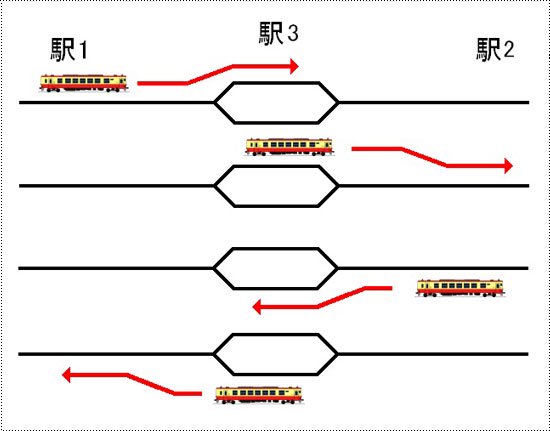
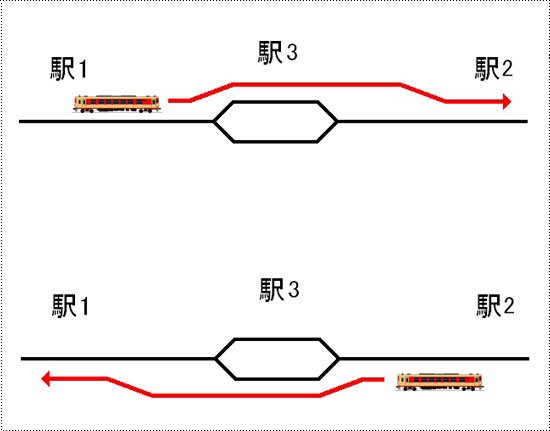
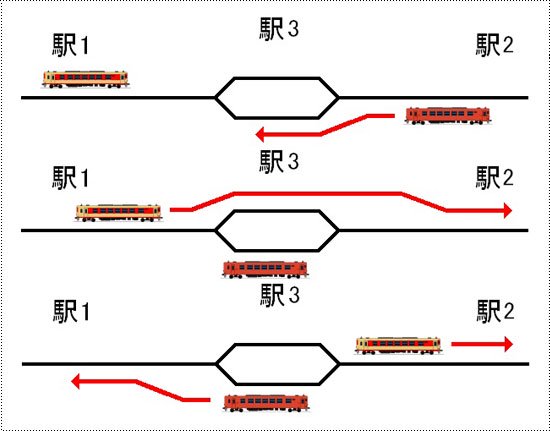
<p style="margin-top:10px;">駅1から列車が発車し、駅3に停車します。一定時間停車し駅2に向かい停車し、一定時間停車後に駅3に戻り、停車し駅1に戻ります。以上の動きを繰り返します。</p>
</div>
<iframe width="560" height="315" src="https://www.youtube.com/embed/JaiqBX3LKT0" title="ATORM DX1 動作パターン1　1列車の各駅停車" frameborder="0" allow="accelerometer; autoplay; clipboard-write; encrypted-media; gyroscope; picture-in-picture; web-share" referrerpolicy="strict-origin-when-cross-origin" allowfullscreen></iframe>


<div style="margin:10px auto 0;text-align:left;">
<img src="https://img02.shop-pro.jp/PA01128/746/etc/atormdx2.jpg?cmsp_timestamp=20160104165927" alt="B：1列車の通過">
</div>
<div style="margin:25px auto 0;text-align:center;">
<img src="https://img02.shop-pro.jp/PA01128/746/etc/atormdx6.jpg?cmsp_timestamp=20160104170234" alt="Bパターンのイラスト">
</div>
<div style="margin:10px 5px 0;">
<p style="margin-top:20px;">駅1から列車が発車し駅3を通過後、駅2に停車します。帰りも駅3を通過して駅1に向かいます。以上の動きを繰り返します。</p>
</div>
<iframe width="560" height="315" src="https://www.youtube.com/embed/XsIWxoe7XtQ" title="ATORM DX1 動作パターン2　1列車の通過" frameborder="0" allow="accelerometer; autoplay; clipboard-write; encrypted-media; gyroscope; picture-in-picture; web-share" referrerpolicy="strict-origin-when-cross-origin" allowfullscreen></iframe>


<div style="margin:10px auto 0;text-align:left;">
<img src="https://img02.shop-pro.jp/PA01128/746/etc/atormdx3.jpg?cmsp_timestamp=20160104170300" alt="C：2列車行き違い 各駅停車">
</div>
<div style="margin:25px auto 0;text-align:center;">
<img src="https://img02.shop-pro.jp/PA01128/746/etc/atormdx7.jpg?cmsp_timestamp=20160104170349" alt="Cパターンのイラスト">
</div>
<div style="margin:10px 5px 0;">
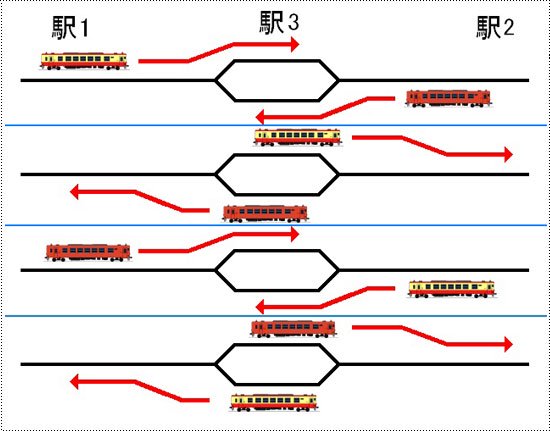
<p style="margin-top:20px;">駅1と駅2それぞれから列車が発車し、駅3に停車します。一定時間停車し、それぞれが駅1、駅2に向かいます。以上の動きを繰り返します。</p>
</div>
<iframe width="560" height="315" src="https://www.youtube.com/embed/68phPxAHLtU" title="ATORM DX1 動作パターン3　2列車行き違い　各駅停車" frameborder="0" allow="accelerometer; autoplay; clipboard-write; encrypted-media; gyroscope; picture-in-picture; web-share" referrerpolicy="strict-origin-when-cross-origin" allowfullscreen></iframe>


<div style="margin:10px auto 0;text-align:left;">
<img src="https://img02.shop-pro.jp/PA01128/746/etc/atormdx4.jpg?cmsp_timestamp=20160104170405" alt="D：2列車行き違い 各駅停車と通過">
</div>
<div style="margin:25px auto 0;text-align:center;">
<img src="https://img02.shop-pro.jp/PA01128/746/etc/atormdx8.jpg?cmsp_timestamp=20160104170454" alt="Dパターンのイラスト">
</div>
<div style="margin:10px 5px 0;">
<p style="margin-top:20px;">駅2から列車が発車し、駅3に停車します。その時駅1から列車が発車し、駅3を通過して駅2に停車します。駅3停車中の列車は、駅1から来た列車が駅3を通過後に駅1に発車します。帰りは逆になり、行きに各駅停車の列車は帰りも各駅停車になります。以上の動きを繰り返します。</p>
</div>
<iframe width="560" height="315" src="https://www.youtube.com/embed/sIKXZfo0Sys" title="ATORM DX1 動作パターン4　2列車行き違い　各駅停車と通過" frameborder="0" allow="accelerometer; autoplay; clipboard-write; encrypted-media; gyroscope; picture-in-picture; web-share" referrerpolicy="strict-origin-when-cross-origin" allowfullscreen></iframe>


<br style="clear:both;">

<div class="free_menu" style="margin:30px 0 25px 0;"><p>センサーとの接続</p></div>
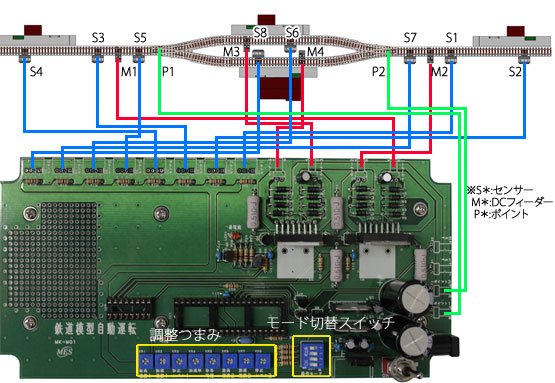
<p>本キットは最大8つのセンサーと4つのDCフィーダー及び2つのポイントを接続して使用します。<br />下図はAパターンの動作に適したセンサーの配線図です。<br />
動作については『本キットの動作』を参照して下さい。<br />
各ポイントと各センサーの位置でタイミングを調整して設置して下さい。</p>
<div style="margin:35px auto 0;text-align:left;">
<img src="https://img02.shop-pro.jp/PA01128/746/etc/autoope25.jpg?202504163728" alt="Aパターンの例">
</div>
<div style="margin:25px auto 0;text-align:center;">
<img src="https://img02.shop-pro.jp/PA01128/746/etc/atormdx10.jpg?cmsp_timestamp=20160105110438" alt="Aパターン配線のイラスト">
</div>

<p style="margin-bottom:20px;">本キットは接点入力(リードスイッチ等)、TCSセンサー又は弊社、車両センサーユニット各種を以下の様に接続して使用します。</p>

<img src="https://img02.shop-pro.jp/PA01128/746/etc/auto_img15.gif?20110809115356" style="float:right;margin:0 0 10px 10px;" />
<p style="font-weight:bold;color:#000;">?リードスイッチの場合</p>
<p>本キットのセンサー1,2の端子にリードスイッチを接続して下さい。<br />リードスイッチを線路に設置し、車両に磁石を取り付ける事で検知します。（右図参照）<br />磁石とリードスイッチの取り付け方向と距離を調整して下さい。</p>
<img src="https://img02.shop-pro.jp/PA01128/746/etc/autoope29.jpg?202505104458" style="margin-top:10px;" />
<br style="clear:both;" />
<img src="https://img02.shop-pro.jp/PA01128/746/etc/auto_img17.gif?20110809135812108" style="float:right;margin:0 0 10px 10px;" />

<p style="font-weight:bold;margin-top:20px;color:#000;">?TOMIX TCSセンサーの場合</p>
<p>TCSセンサーのケーブルからコネクタを外して先バラにします。（右図参照）<br />本キットのセンサー1,2,3の各端子に右図に対応するケーブルを接続して下さい。<br />尚、本キットではTCSセンサの方向別検知に対応していませんのでセンサーはどちら向きでも良いです。</p>
<img src="https://img02.shop-pro.jp/PA01128/746/etc/autoope28.jpg?202505104108" style="margin-top:10px;" />

<p style="font-weight:bold;margin-top:20px;color:#000;">?弊社 車両センサーユニット（オプション）の場合</p>
<p>本キットのJ1〜J4の各端子を車両センサーユニット（<a href="https://www.mes-ekit.com/?pid=127642054">CDS式</a>・<a href="https://www.mes-ekit.com/?pid=127645351">軌道回路式</a>・<a href="https://www.mes-ekit.com/?pid=92148338">反射式</a>）のOUT1〜4にそれぞれ接続して下さい（＊反射式はOUT2〜4）。<br />各センサーとの接続は車両センサーユニットの説明書をご覧下さい。</p>
<img src="https://img02.shop-pro.jp/PA01128/746/etc/autoope30.jpg?202505104546" style="margin-top:10px;" />

<p style="font-weight:bold;margin-top:20px;color:#000;">?DCフィーダーの接続</p>
<p>本キットのM1〜M4端子にDCフィーダーのコードを接続して下さい。</p>
<img src="https://img02.shop-pro.jp/PA01128/746/etc/autoope31.jpg?202505144740" style="margin-top:10px;" />

<p style="font-weight:bold;margin-top:20px;color:#000;">?ポイントとの接続</p>
<p>本キットのP1、P2端子にポイントマシンのコードを接続して下さい。</p>
<img src="https://img02.shop-pro.jp/PA01128/746/etc/atormdx9.jpg?cmsp_timestamp=20160105095112" style="margin-top:10px;" />

<br style="clear:both;">
<div class="free_menu" style="margin:30px 0 25px 0;"><p>動作の調整</p></div>

<p style="margin-top:20px;">そなえつけの可変抵抗を調整することにより、停車時間の調整などが出来ます。</p>

<table style="border-top:1px solid #ccc;border-left:1px solid #ccc;margin:20px 15px 0;" border="0" cellpadding="0" cellspacing="0">
<tbody><tr>
<th style="border-bottom:1px solid #ccc;border-right:1px solid #ccc;vertical-align:middle;padding:10px;">VR1・VR6</th>
<td style="border-bottom:1px solid #ccc;border-right:1px solid #ccc;vertical-align:middle;padding:10px;">最高速度</td>
<td style="border-bottom:1px solid #ccc;border-right:1px solid #ccc;vertical-align:middle;padding:10px;">発車後の速度</td>
</tr>
<tr>
<th style="border-bottom:1px solid #ccc;border-right:1px solid #ccc;vertical-align:middle;padding:10px;">VR2・VR7</th>
<td style="border-bottom:1px solid #ccc;border-right:1px solid #ccc;vertical-align:middle;padding:10px;">減速速度</td>
<td style="border-bottom:1px solid #ccc;border-right:1px solid #ccc;vertical-align:middle;padding:10px;">減速センサー通過後の速度</td>
</tr>
<tr>
<th style="border-bottom:1px solid #ccc;border-right:1px solid #ccc;vertical-align:middle;padding:10px;">VR3・VR8</th>
<td style="border-bottom:1px solid #ccc;border-right:1px solid #ccc;vertical-align:middle;padding:10px;">停止レベル</td>
<td style="border-bottom:1px solid #ccc;border-right:1px solid #ccc;vertical-align:middle;padding:10px;">停車中電灯の明るさ</td>
</tr>
<tr>
<th style="border-bottom:1px solid #ccc;border-right:1px solid #ccc;vertical-align:middle;padding:10px;">VR4</th>
<td style="border-bottom:1px solid #ccc;border-right:1px solid #ccc;vertical-align:middle;padding:10px;">加速率</td>
<td style="border-bottom:1px solid #ccc;border-right:1px solid #ccc;vertical-align:middle;padding:10px;">加速・減速の度合い</td>
</tr>
<tr>
<th style="border-bottom:1px solid #ccc;border-right:1px solid #ccc;vertical-align:middle;padding:10px;">VR5</th>
<td style="border-bottom:1px solid #ccc;border-right:1px solid #ccc;vertical-align:middle;padding:10px;">停車時間</td>
<td style="border-bottom:1px solid #ccc;border-right:1px solid #ccc;vertical-align:middle;padding:10px;">駅での停車時間</td>
</tr>
</tbody></table>
<br>

<br style="clear:both;">
<div class="free_menu" style="margin:30px 0 10px 0;"><p>仕様</p></div>
<table style="border-top:1px solid #ccc;border-left:1px solid #ccc;margin:20px 15px 0;" border="0" cellpadding="0" cellspacing="0">
<tbody><tr>
<th style="border-bottom:1px solid #ccc;border-right:1px solid #ccc;vertical-align:middle;padding:10px;">電源電圧</th>
<td style="border-bottom:1px solid #ccc;border-right:1px solid #ccc;vertical-align:middle;padding:10px;">DC12V(ACアダプター内封)</td>
</tr>
</tbody></table>
<br>

<br style="clear:both;">

<div class="free_menu" style="margin:30px 0 10px 0;"><p>おすすめ商品</p></div>
<a href="http://www.mes-ekit.com/?pid=92148338"><img src="//img02.shop-pro.jp/PA01128/746/etc/reco_img9.jpg?cmsp_timestamp=20160418161512" style="margin: 10px 0px 0px 0px;" alt=車両センサーユニット"></a>

<div class="free_menu" style="margin:30px 0 10px 0;"><p>ご注文</p></div>
]]></content:encoded>
    <dc:date>2026-05-19T09:02:31+09:00</dc:date>
    <dc:creator>電子工作キット、工作部品の通販店　マイクロ電子サービスオンラインショップ</dc:creator>
    <foaf:topic><foaf:Image rdf:about="https://img02.shop-pro.jp/PA01128/746/product/191878553_th.jpg?cmsp_timestamp=20260519113824" /></foaf:topic>
  </item>

  <item rdf:about="https://www.mes-ekit.com/?pid=191864777">
    <link>https://www.mes-ekit.com/?pid=191864777</link>
    <title>鉄道模型自動運転キット ATORM DX1</title>
    <description>

</description>
<content:encoded><![CDATA[
<img src="https://img02.shop-pro.jp/PA01128/746/etc/atormdx37.jpg?cmsp_timestamp=20160422112025" style="margin: 0px 0px 5px 0px;" alt=鉄道模型自動運転キットATORM DX1"キャッチ>

<img src="https://img02.shop-pro.jp/PA01128/746/etc/atormdx46.jpg?cmsp_timestamp=20160422113336" alt="鉄道模型自動運転キット ATORM DX1" style="margin:0px 0;" />

<p>当キットは、鉄道模型自動運転キット『ATORM』のバージョンアップ版です。2列車を同時に制御ができ、線路の切り替えポイントの制御もできるようになっていますので、単線で同時に2列車を動かすことができ、使用できるレイアウトの幅が広がります。<br>
また最新Verでは、<a href="https://www.mes-ekit.com/?pid=145620810">模型用鉄道信号機キット</a>と連動可能になりました。
</p>

<br>
<strong><span style="font-size:x-large;"><span style="color:#0000FF"><u>鉄道模型自動運転システム　ATORM　とは</u></span></span></strong>
<br>
<p>鉄道模型を自動で制御して走行させる事が出来るシステムです。模型車両を多くコレクションしている方でも気軽に走らせる事が出来る様、車両は市販の標準状態で入線出来ます。DCC等の様な組み込みや改造は不要なので、沢山の車両を保有していても安心です。<br>
・標準状態の車両はNゲージなどのDC12Vで車両に動力のモーター、室内灯、前尾照灯などが装備された車両になります。（最低モーターがあれば運転可能です）
<img src="https://img02.shop-pro.jp/PA01128/746/etc_base64/YXRvcm1fZHhfbmV3MQ.jpg?cmsp_timestamp=20260518144134" alt="">
<br>
<strong><span style="font-size:x-large;"><span style="color:#0000FF"><u>家庭でのレイアウトに丁度良いシステム</u></span></span></strong>
<br>
<p>他社の自動運転システムの様な拡張性はありませんが、鉄道博物館などの巨大なジオラマや集合式レイアウトでもなければ大抵の家庭のレイアウトは駅が2、3程度ではないでしょうか。ATORMは家庭でのレイアウトで扱いやすい様、運転パターンを限定し、設定も簡単にしました。</p>
<br>
<strong><span style="font-size:x-large;"><span style="color:#0000FF"><u>新機能追加　信号機制御に対応</u></span></span></strong>
<br>
<p>模型用鉄道信号機キットと接続し、出発信号機や場内信号機の演出が可能になりました。これにより駅のリアルな情景も再現可能になります。<br>
・信号機を使用する場合は減速センサーの使用を推奨します。よりリアルに動作します。</p>
<img src="https://img02.shop-pro.jp/PA01128/746/etc_base64/YXRvcm1fZHhfbmV3Mg.jpg?cmsp_timestamp=20260518145639" alt="">

<iframe width="560" height="315" src="https://www.youtube.com/embed/KGRKBR1qLkE" title="ATORM DX 信号機連動" frameborder="0" allow="accelerometer; autoplay; clipboard-write; encrypted-media; gyroscope; picture-in-picture; web-share" referrerpolicy="strict-origin-when-cross-origin" allowfullscreen></iframe>
<br><br>

<strong><span style="font-size:x-large;"><span style="color:#0000FF"><u>より使い勝手が良くなる改良点</u></span></span></strong>
<br>
<p>減速センサーから減速して停止センサーで駅に停車する時の減速率を大きくし、停車位置を合わせ易くしました。加速率をゆっくりにすると停車位置がオーバーランする悩みも低減できます。</p>
<img src="https://img02.shop-pro.jp/PA01128/746/etc_base64/YXRvcm1fZHhfbmV3Mw.jpg?cmsp_timestamp=20260518155336" alt="">


<img src="https://img02.shop-pro.jp/PA01128/746/etc/atormdx19.jpg?cmsp_timestamp=20160107094604" alt="商品の特徴" style="margin:5px 0 5px;" />

<img src="https://img02.shop-pro.jp/PA01128/746/etc/atormdx20.jpg?cmsp_timestamp=20160108142533" alt="1.2列車を同時に制御可能に" style="margin: 5px 0pt 5px;" />

<table border="0" cellpadding="0" cellspacing="0">
<tbody><tr>
<td style="width: 150px; text-align: center; vertical-align: top;">
<img src="https://img02.shop-pro.jp/PA01128/746/etc/atormdx16.jpg?cmsp_timestamp=20160106131222" alt="2列車制御" style="margin: 0pt 10px 5px 0pt;" />
</td>
<td style="vertical-align: top;">
<p style="margin: 0pt 10px 0pt 0pt;">弊社の鉄道模型自動運転キット【ATORM】では、1列車のみの制御となっていました。【ATORM　DX1】は2列車の制御が1つのキットで可能になります。また、単線での2列車の運用が可能になりました。お持ちのレイアウトにあった動作パターンをお選びいただき、よりリアルに臨場感あふれるレイアウトに仕上げてみてはいかがでしょうか。</p>
</td>
</tr>
</tbody></table>

<img src="https://img02.shop-pro.jp/PA01128/746/etc/atormdx21.jpg?cmsp_timestamp=20160108142554" alt="2.ポイントを自動で制御" style="margin: 5px 0pt 5px;" />

<table border="0" cellpadding="0" cellspacing="0">
<tbody><tr>
<td style="width: 150px; text-align: center; vertical-align: top;">
<img src="https://img02.shop-pro.jp/PA01128/746/etc/atormdx17.jpg?cmsp_timestamp=20160106131239" alt="ポイントの接続" style="margin: 0pt 10px 5px 0pt;" />
</td>
<td style="vertical-align: top;">
<p style="margin: 0pt 10px 0pt 0pt;">【ATORM　DX1】ではポイントの切り替えを自動で制御できるようになりました。</p>
<br>
<p style="margin: 0pt 10px 0pt 0pt; font-size:95%; color:#f20a0a;">使用できるポイントについて<br>本キットでは2線式のものが使用できます。従来の3線式は使用できません。また、両渡りポイントなど、複数の先端軌条を動かすポイントは対応出来ない場合があります。単独のポイントを使用してください。</p>
</td>
</tr>
</tbody></table>

<br style="clear:both;">
<div class="free_menu" style="margin:30px 0 25px 0;"><p>その他の特徴</p></div>

<strong><span style="font-size:x-large;"><span style="color:#0000FF"><u>夜景も再現できます</u></span></span></strong>
<br>
<p>ATORMではLED室内灯を組み込んだ車両を停車中点灯させる事が出来ます。又、夜景に対応出来る車両センサーやハルLEDを組み込んだ建物と合わせる事で夜の鉄道風景を演出可能です。<br>
・TOMIX常点灯、マイクロエース室内灯で点灯。KATOのLED室内灯でも停車中点灯効果があります(明るさの若干の変動はあります)。コアレスモーターの機関車と組み合わせた場合に停車中点灯の効果を発揮出来ない場合があります。</p>
<img src="https://img02.shop-pro.jp/PA01128/746/etc_base64/YXRvcm1fZHhfbmV3NA.jpg?cmsp_timestamp=20260518160809" alt="">
<br><br>
<strong><span style="font-size:x-large;"><span style="color:#0000FF"><u>なりきり発車ベルに接続可能</u></span></span></strong>
<br>
<p>なりきり発車ベルを接続して自動で発車ベルを鳴らす事が可能です。
<br>・発車ベルは運転パターンにより鳴らせる駅が限定されます。又、信号機制御と排他使用となります。
<br><br>
<strong><span style="font-size:x-large;"><span style="color:#0000FF"><u>車両センサーは選択可能</u></span></span></strong>
<br>
<p>Nゲージ、HOゲージなど、様々な条件のレイアウトに使用出来る様、車両センサーは各種選択可能。後付けでCDSセンサー、夜景が再現出来る反射式センサー、TCSセンサーも改造で使えます。一部の運転パターンを除いて、停車センサーを使用しなくても運転可能です。停車位置の精度や予算に合わせて選択可能です。</p>

<br style="clear:both;">
<div class="free_menu" style="margin:30px 0 25px 0;"><p>本キットの動作</p></div>

<div style="margin:5px auto 0;text-align:left;">
<img src="https://img02.shop-pro.jp/PA01128/746/etc/atormdx1.jpg?cmsp_timestamp=20160104165748" alt="A：1列車の各駅停車">
</div>
<div style="margin:25px auto 0;text-align:center;">
<img src="https://img02.shop-pro.jp/PA01128/746/etc/atormdx5.jpg?cmsp_timestamp=20160104165843" alt="Aパターンのイラスト">
</div>
<div style="margin:10px 5px 0;">
<p style="margin-top:10px;">駅1から列車が発車し、駅3に停車します。一定時間停車し駅2に向かい停車し、一定時間停車後に駅3に戻り、停車し駅1に戻ります。以上の動きを繰り返します。</p>
</div>
<iframe width="560" height="315" src="https://www.youtube.com/embed/JaiqBX3LKT0" title="ATORM DX1 動作パターン1　1列車の各駅停車" frameborder="0" allow="accelerometer; autoplay; clipboard-write; encrypted-media; gyroscope; picture-in-picture; web-share" referrerpolicy="strict-origin-when-cross-origin" allowfullscreen></iframe>


<div style="margin:10px auto 0;text-align:left;">
<img src="https://img02.shop-pro.jp/PA01128/746/etc/atormdx2.jpg?cmsp_timestamp=20160104165927" alt="B：1列車の通過">
</div>
<div style="margin:25px auto 0;text-align:center;">
<img src="https://img02.shop-pro.jp/PA01128/746/etc/atormdx6.jpg?cmsp_timestamp=20160104170234" alt="Bパターンのイラスト">
</div>
<div style="margin:10px 5px 0;">
<p style="margin-top:20px;">駅1から列車が発車し駅3を通過後、駅2に停車します。帰りも駅3を通過して駅1に向かいます。以上の動きを繰り返します。</p>
</div>
<iframe width="560" height="315" src="https://www.youtube.com/embed/XsIWxoe7XtQ" title="ATORM DX1 動作パターン2　1列車の通過" frameborder="0" allow="accelerometer; autoplay; clipboard-write; encrypted-media; gyroscope; picture-in-picture; web-share" referrerpolicy="strict-origin-when-cross-origin" allowfullscreen></iframe>


<div style="margin:10px auto 0;text-align:left;">
<img src="https://img02.shop-pro.jp/PA01128/746/etc/atormdx3.jpg?cmsp_timestamp=20160104170300" alt="C：2列車行き違い 各駅停車">
</div>
<div style="margin:25px auto 0;text-align:center;">
<img src="https://img02.shop-pro.jp/PA01128/746/etc/atormdx7.jpg?cmsp_timestamp=20160104170349" alt="Cパターンのイラスト">
</div>
<div style="margin:10px 5px 0;">
<p style="margin-top:20px;">駅1と駅2それぞれから列車が発車し、駅3に停車します。一定時間停車し、それぞれが駅1、駅2に向かいます。以上の動きを繰り返します。</p>
</div>
<iframe width="560" height="315" src="https://www.youtube.com/embed/68phPxAHLtU" title="ATORM DX1 動作パターン3　2列車行き違い　各駅停車" frameborder="0" allow="accelerometer; autoplay; clipboard-write; encrypted-media; gyroscope; picture-in-picture; web-share" referrerpolicy="strict-origin-when-cross-origin" allowfullscreen></iframe>


<div style="margin:10px auto 0;text-align:left;">
<img src="https://img02.shop-pro.jp/PA01128/746/etc/atormdx4.jpg?cmsp_timestamp=20160104170405" alt="D：2列車行き違い 各駅停車と通過">
</div>
<div style="margin:25px auto 0;text-align:center;">
<img src="https://img02.shop-pro.jp/PA01128/746/etc/atormdx8.jpg?cmsp_timestamp=20160104170454" alt="Dパターンのイラスト">
</div>
<div style="margin:10px 5px 0;">
<p style="margin-top:20px;">駅2から列車が発車し、駅3に停車します。その時駅1から列車が発車し、駅3を通過して駅2に停車します。駅3停車中の列車は、駅1から来た列車が駅3を通過後に駅1に発車します。帰りは逆になり、行きに各駅停車の列車は帰りも各駅停車になります。以上の動きを繰り返します。</p>
</div>
<iframe width="560" height="315" src="https://www.youtube.com/embed/sIKXZfo0Sys" title="ATORM DX1 動作パターン4　2列車行き違い　各駅停車と通過" frameborder="0" allow="accelerometer; autoplay; clipboard-write; encrypted-media; gyroscope; picture-in-picture; web-share" referrerpolicy="strict-origin-when-cross-origin" allowfullscreen></iframe>


<br style="clear:both;">

<div class="free_menu" style="margin:30px 0 25px 0;"><p>センサーとの接続</p></div>
<p>本キットは最大8つのセンサーと4つのDCフィーダー及び2つのポイントを接続して使用します。<br />下図はAパターンの動作に適したセンサーの配線図です。<br />
動作については『本キットの動作』を参照して下さい。<br />
各ポイントと各センサーの位置でタイミングを調整して設置して下さい。</p>
<div style="margin:35px auto 0;text-align:left;">
<img src="https://img02.shop-pro.jp/PA01128/746/etc/autoope25.jpg?202504163728" alt="Aパターンの例">
</div>
<div style="margin:25px auto 0;text-align:center;">
<img src="https://img02.shop-pro.jp/PA01128/746/etc/atormdx10.jpg?cmsp_timestamp=20160105110438" alt="Aパターン配線のイラスト">
</div>

<p style="margin-bottom:20px;">本キットは接点入力(リードスイッチ等)、TCSセンサー又は弊社、車両センサーユニット各種を以下の様に接続して使用します。</p>

<img src="https://img02.shop-pro.jp/PA01128/746/etc/auto_img15.gif?20110809115356" style="float:right;margin:0 0 10px 10px;" />
<p style="font-weight:bold;color:#000;">?リードスイッチの場合</p>
<p>本キットのセンサー1,2の端子にリードスイッチを接続して下さい。<br />リードスイッチを線路に設置し、車両に磁石を取り付ける事で検知します。（右図参照）<br />磁石とリードスイッチの取り付け方向と距離を調整して下さい。</p>
<img src="https://img02.shop-pro.jp/PA01128/746/etc/autoope29.jpg?202505104458" style="margin-top:10px;" />
<br style="clear:both;" />
<img src="https://img02.shop-pro.jp/PA01128/746/etc/auto_img17.gif?20110809135812108" style="float:right;margin:0 0 10px 10px;" />

<p style="font-weight:bold;margin-top:20px;color:#000;">?TOMIX TCSセンサーの場合</p>
<p>TCSセンサーのケーブルからコネクタを外して先バラにします。（右図参照）<br />本キットのセンサー1,2,3の各端子に右図に対応するケーブルを接続して下さい。<br />尚、本キットではTCSセンサの方向別検知に対応していませんのでセンサーはどちら向きでも良いです。</p>
<img src="https://img02.shop-pro.jp/PA01128/746/etc/autoope28.jpg?202505104108" style="margin-top:10px;" />

<p style="font-weight:bold;margin-top:20px;color:#000;">?弊社 車両センサーユニット（オプション）の場合</p>
<p>本キットのJ1〜J4の各端子を車両センサーユニット（<a href="https://www.mes-ekit.com/?pid=127642054">CDS式</a>・<a href="https://www.mes-ekit.com/?pid=127645351">軌道回路式</a>・<a href="https://www.mes-ekit.com/?pid=92148338">反射式</a>）のOUT1〜4にそれぞれ接続して下さい（＊反射式はOUT2〜4）。<br />各センサーとの接続は車両センサーユニットの説明書をご覧下さい。</p>
<img src="https://img02.shop-pro.jp/PA01128/746/etc/autoope30.jpg?202505104546" style="margin-top:10px;" />

<p style="font-weight:bold;margin-top:20px;color:#000;">?DCフィーダーの接続</p>
<p>本キットのM1〜M4端子にDCフィーダーのコードを接続して下さい。</p>
<img src="https://img02.shop-pro.jp/PA01128/746/etc/autoope31.jpg?202505144740" style="margin-top:10px;" />

<p style="font-weight:bold;margin-top:20px;color:#000;">?ポイントとの接続</p>
<p>本キットのP1、P2端子にポイントマシンのコードを接続して下さい。</p>
<img src="https://img02.shop-pro.jp/PA01128/746/etc/atormdx9.jpg?cmsp_timestamp=20160105095112" style="margin-top:10px;" />

<br style="clear:both;">
<div class="free_menu" style="margin:30px 0 25px 0;"><p>動作の調整</p></div>

<p style="margin-top:20px;">そなえつけの可変抵抗を調整することにより、停車時間の調整などが出来ます。</p>

<table style="border-top:1px solid #ccc;border-left:1px solid #ccc;margin:20px 15px 0;" border="0" cellpadding="0" cellspacing="0">
<tbody><tr>
<th style="border-bottom:1px solid #ccc;border-right:1px solid #ccc;vertical-align:middle;padding:10px;">VR1・VR6</th>
<td style="border-bottom:1px solid #ccc;border-right:1px solid #ccc;vertical-align:middle;padding:10px;">最高速度</td>
<td style="border-bottom:1px solid #ccc;border-right:1px solid #ccc;vertical-align:middle;padding:10px;">発車後の速度</td>
</tr>
<tr>
<th style="border-bottom:1px solid #ccc;border-right:1px solid #ccc;vertical-align:middle;padding:10px;">VR2・VR7</th>
<td style="border-bottom:1px solid #ccc;border-right:1px solid #ccc;vertical-align:middle;padding:10px;">減速速度</td>
<td style="border-bottom:1px solid #ccc;border-right:1px solid #ccc;vertical-align:middle;padding:10px;">減速センサー通過後の速度</td>
</tr>
<tr>
<th style="border-bottom:1px solid #ccc;border-right:1px solid #ccc;vertical-align:middle;padding:10px;">VR3・VR8</th>
<td style="border-bottom:1px solid #ccc;border-right:1px solid #ccc;vertical-align:middle;padding:10px;">停止レベル</td>
<td style="border-bottom:1px solid #ccc;border-right:1px solid #ccc;vertical-align:middle;padding:10px;">停車中電灯の明るさ</td>
</tr>
<tr>
<th style="border-bottom:1px solid #ccc;border-right:1px solid #ccc;vertical-align:middle;padding:10px;">VR4</th>
<td style="border-bottom:1px solid #ccc;border-right:1px solid #ccc;vertical-align:middle;padding:10px;">加速率</td>
<td style="border-bottom:1px solid #ccc;border-right:1px solid #ccc;vertical-align:middle;padding:10px;">加速・減速の度合い</td>
</tr>
<tr>
<th style="border-bottom:1px solid #ccc;border-right:1px solid #ccc;vertical-align:middle;padding:10px;">VR5</th>
<td style="border-bottom:1px solid #ccc;border-right:1px solid #ccc;vertical-align:middle;padding:10px;">停車時間</td>
<td style="border-bottom:1px solid #ccc;border-right:1px solid #ccc;vertical-align:middle;padding:10px;">駅での停車時間</td>
</tr>
</tbody></table>
<br>

<br style="clear:both;">
<div class="free_menu" style="margin:30px 0 10px 0;"><p>仕様</p></div>
<table style="border-top:1px solid #ccc;border-left:1px solid #ccc;margin:20px 15px 0;" border="0" cellpadding="0" cellspacing="0">
<tbody><tr>
<th style="border-bottom:1px solid #ccc;border-right:1px solid #ccc;vertical-align:middle;padding:10px;">電源電圧</th>
<td style="border-bottom:1px solid #ccc;border-right:1px solid #ccc;vertical-align:middle;padding:10px;">DC12V(ACアダプター内封)</td>
</tr>
</tbody></table>
<br>

<br style="clear:both;">
<div class="free_menu" style="margin:30px 0 25px 0;"><p>回路図</p></div>
<div style="margin:0 5px;">
<img src="https://img02.shop-pro.jp/PA01128/746/etc/atormdx11.jpg?cmsp_timestamp=20160105143939" alt="鉄道模型自動運転キットプリント基板（表）" style="float:left;margin-right:10px;">
<img src="https://img02.shop-pro.jp/PA01128/746/etc/atormdx12.jpg?cmsp_timestamp=20160105144025" alt="鉄道模型自動運転キットプリント基板（裏）">
</div>
<br style="clear:both;">
<a href="http://img02.shop-pro.jp/PA01128/746/etc/atormdx13.jpg?cmsp_timestamp=20160105144049"><img src="https://img02.shop-pro.jp/PA01128/746/etc/atormdx14.jpg?cmsp_timestamp=20160105144100" alt="鉄道模型自動運転キット回路図" style="margin-top:10px;"></a>

<div class="free_menu" style="margin:30px 0 10px 0;"><p>セット内容</p></div>
<table border="0" cellspacing="0" cellpadding="0" style="margin:20px 15px 0;">
<tr>
<td style="vertical-align:top"><img src="https://img02.shop-pro.jp/PA01128/746/etc/atormdx15.jpg?cmsp_timestamp=20160105145158" alt="鉄道模型自動運転キットセット内容" style="margin-right:10px;">
</td>
<td>
<p>
（1）専用プリント基板 … 1枚<br>
（2）制御IC (PIC16F18877) … 1個<br>
（3）ICソケット（40ピン）…1個<br>
（4）IC (74HC4053) … 1個<br>
（5）ICソケット（16ピン）… 1個<br>
（6）IC (L298N) … 2個<br>
（7）IC (TA8428K) … 1個<br>
（8）IC (7805) … 1個<br>
（9）トランジスタ (2SA1015) … 1個<br>
（10）トランジスタ (2SC1815) … 6個<br>
（11）抵抗内臓トランジスタ (FJN3302) … 1個<br>
（12）セラミックレゾネータ（20MHz） … 1個<br>
（13）抵抗 (10KΩ) … 21個<br>
（14）抵抗 (1KΩ) … 1個<br>
（15）酸金抵抗 (0.51Ω) … 4個<br>
（16）可変抵抗 (10KΩB) … 8個<br>
（17）ディップスイッチ … 1個<br>
（18）ダイオード … 16個<br>
（19）積層セラミックコンデンサ (0.1μF) … 6個<br>
（20）電解コンデンサ（2200μF） … 2個<br>
（21）電解コンデンサ（22〜47μF） … 6個<br>
（22）LED(赤)3mm … 1個<br>
（23）DCジャック … 1個<br>
（24）トグルスイッチ … 1個<br>
（25）なべビス（M3×6） … 6個<br>
（26）スペーサ … 6個<br>
（27）ACアダプター（DC12V） … 1個<br>
</p>
</td>
</tr>
</table>

<div class="free_menu" style="margin:30px 0 10px 0;"><p>オプション等</p></div>

<a href="http://www.mes-ekit.com/?mode=f23"><img src="https://img02.shop-pro.jp/PA01128/746/etc/break.gif?20130828110558" style="margin: 10px 0px 0px 0pt;" alt="部品が壊れても一個までなら無料保証！"></a>

<a href="http://www.mes-ekit.com/?mode=f8"><img alt="専用プリント基板だから、回路図が読めなくても作れる！" style="margin: 10px 0px 0px;" src="http://img02.shop-

pro.jp/PA01128/746/etc/manual2.gif?20110711103515"/></a>

<a href="http://www.mes-ekit.com/?mode=f9"><img alt="初心者でも大丈夫!はんだごて図解マニュアル付き" style="margin: 10px 0px 0px;" src="https://img02.shop-pro.jp/PA01128/746/etc/manual.gif?20110711103454"/></a>

<a href="http://www.mes-ekit.com/?tid=2&mode=f42"><img src="https://img02.shop-pro.jp/PA01128/746/etc/manual5.gif?cmsp_timestamp=20170822153258" style="margin: 10px 0px 0px 0pt;" alt="製作したの動かないときはコチラ"></a>

<a href="http://www.mes-ekit.com/?pid=92148338"><img src="https://img02.shop-pro.jp/PA01128/746/etc/reco_img9.jpg?cmsp_timestamp=20160418161512" style="margin: 10px 0px 0px 0px;" alt=車両センサーユニット(反射式)"></a>

<a href="https://www.mes-ekit.com/?pid=191878553"><img src="https://img02.shop-pro.jp/PA01128/746/etc/reco_img14.jpg?cmsp_timestamp=20160419170458" style="margin: 10px 0px 0px 0px;" alt=【完成品】鉄道模型自動運転キットATORM DX1"></a>

<a href="https://www.mes-ekit.com/?pid=191878901"><img src="https://img02.shop-pro.jp/PA01128/746/etc/reco_img2.jpg?cmsp_timestamp=20160418161540" style="margin: 10px 0px 0px 0px;" alt="鉄道模型自動運転キット ATORM2"></a>

<div class="free_menu" style="margin:30px 0 10px 0;"><p>ご注文</p></div><strong></strong><span style="color:#0000FF"></span><em></em><em></em><em></em>
]]></content:encoded>
    <dc:date>2026-05-18T09:55:37+09:00</dc:date>
    <dc:creator>電子工作キット、工作部品の通販店　マイクロ電子サービスオンラインショップ</dc:creator>
    <foaf:topic><foaf:Image rdf:about="https://img02.shop-pro.jp/PA01128/746/product/191864777_th.jpg?cmsp_timestamp=20260519113135" /></foaf:topic>
  </item>

  <item rdf:about="https://www.mes-ekit.com/?pid=186977892">
    <link>https://www.mes-ekit.com/?pid=186977892</link>
    <title>HOゲージ第1種自動踏切キット（4遮断機）動作セット（反射式）　ACアダプター付</title>
    <description>このセットは、HOゲージ踏切キットと車両センサーユニット（反射式）、第1種自動踏切キット（4遮断機アップグレード版）を1つにしたキットです。このセットだけで、遮断機の制御が可能になります。
詳しい動作は各キットのページをご覧ください。
[対応製品]
HOゲージ...</description>
<content:encoded><![CDATA[
<p>このセットは、<a href="https://www.mes-ekit.com/?pid=27380368">HOゲージ踏切キット</a>と<a href="https://www.mes-ekit.com/?pid=92148338">車両センサーユニット（反射式）</a>、<a href="http://www.mes-ekit.com/?pid=81331710">第1種自動踏切キット（4遮断機アップグレード版）</a>を1つにしたキットです。このセットだけで、遮断機の制御が可能になります。</p>
<p style="font-size:1.3em;color:red;font-weight:bold;margin-top:15px;margin-bottom:15px;">詳しい動作は各キットのページをご覧ください。</p>
<p style="font-weight:bold;">[対応製品]</p>
<p><a href="https://www.mes-ekit.com/?pid=27380368">HOゲージ踏切キット</a><br /> 
<a href="https://www.mes-ekit.com/?pid=92148338">車両センサーユニット（反射式）</a><br />
<a href="http://www.mes-ekit.com/?pid=81331710">第1種自動踏切キット（4遮断機アップグレード版）</a>
</p>

<br style="clear:both;">

<div class="free_menu" style="margin:30px 0 10px 0;clear:both;"><p>【センサーの取付け】</p></div>
<p>取り付ける線路の道床に12×8mmの穴をあけ、センサーを埋め込んで固定します。<br>
固定の際は、センサーの上面がレールの踏面より出ない様にします。<br>
(クリーニングカーなどが通過できなくなります。)<br>
※Nゲージの場合、レール内側の幅いっぱいになります。<br>
※TOMIX製のレールの場合、センサーが道床の下側にわずかにはみ出して、レールが浮く場合があります。</p>
<table border="0" cellspacing="0" cellpadding="0" style="margin:10px 0;">
<tr>
<td><img src="//img02.shop-pro.jp/PA01128/746/etc/reflection_img2.jpg?cmsp_timestamp=20150728133546" /></td>
<td style="vertical-align:middle;"><img src="//img02.shop-pro.jp/PA01128/746/etc/sensor_img7.gif?20110810140310" style="margin:0 10px;" /></td>
<td><img src="//img02.shop-pro.jp/PA01128/746/etc/reflection_img3.jpg?cmsp_timestamp=20150728133603" /></td>
</tr>
</table>
<br>
<img src="//img02.shop-pro.jp/PA01128/746/etc/reflection_img4.jpg?cmsp_timestamp=20150728140609" style="float:left;margin:0 10px 10px 0px;" />
<p>
センサーをトンネル内など、上部に障害物がある場所に設置する場合は、70〜90mm以上の空間を空けてください。
</p>


<br style="clear:both;">
<div class="free_menu" style="margin:30px 0 10px 0;"><p>【センサー配線】</p></div>
<img src="//img02.shop-pro.jp/PA01128/746/etc/reflection_img1.jpg?cmsp_timestamp=20150728134025" style="float:left;margin:0 10px 10px 0px;" />
<p>
踏切基板のSENSOR1〜4の各端子と車両センサーは以下の様に接続して下さい。それぞれの説明書もご覧ください。<br>
<div class="table_type1">
<table border="0" cellpadding="0" cellspacing="0">
<tr>
<th>車両センサー</th>
<th>踏切基板(SENSOR)</th>
</tr>
<tr>
<td>緑</td><td>4</td>
</tr>
<tr>
<td>灰(中央)</td><td>1又は3</td>
</tr>
<tr>
<td>灰(端)</td><td>2</td>
</tr>
</table>
</div>
</p>

<br style="clear:both;">
<div class="free_menu" style="margin:30px 0 10px 0;"><p>【収録曲】</p></div>
<div style="margin-top:10px;width:100%;text-align:center;">
<span style="color: red; font-size: 16px; font-weight: bold; line-height: 30px;">視聴音は<a href="http://www.m-mes.co.jp/sample_humikiri.html">コチラのページ</a>でご確認下さい。</span>
</div>

<br style="clear:both;">
<div class="free_menu" style="margin:30px 0 10px 0;"><p>【セット内容】</p></div>
<table border="0" cellspacing="0" cellpadding="0" style="margin:20px 15px 0;">
<tr>
<td style="vertical-align:top"><img src="https://img02.shop-pro.jp/PA01128/746/product/186977892.gif?cmsp_timestamp=20250606111020" alt="セット内容" style="margin-right:10px;">
</td>
<td>
<p>
・<a href="https://www.mes-ekit.com/?pid=27380368">HOゲージ踏切キット</a><br>
・<a href="https://www.mes-ekit.com/?pid=92148338">車両センサーユニット（反射式）</a><br>
・<a href="http://www.mes-ekit.com/?pid=81331710">第1種自動踏切キット（4遮断機アップグレード版）</a><br>
</p>
</td>
</tr>
</table>
<br>

<p style="font-size:1.3em;color:red;font-weight:bold;margin-top:15px;margin-bottom:15px;">※このセットには標準でACアダプターが付属しています。</p>

<a href="http://www.mes-ekit.com/?mode=f8"><img src="https://img02.shop-pro.jp/PA01128/746/etc/manual2.gif?20110711103515" style="margin: 40px 0px 0px 0pt;" alt="専用プリント基板だから、回路図が読めなくても作れる！"></a>
<a href="http://www.mes-ekit.com/?mode=f9"><img src="https://img02.shop-pro.jp/PA01128/746/etc/manual.gif?20110711103454" style="margin: 10px 0px 30px 0pt;" alt="初心者でも大丈夫!はんだごて図解マニュアル付き"></a>

<div class="free_menu" style="margin:30px 0 10px 0;clear:both;"><p>踏切キットガイド</p></div>
<ul>
どの商品を選べば良いのか分からない方は<a href="https://www.mes-ekit.com/?pid=164926678">こちら</a>をご参考に。<br>
</ul>

<br style="clear:both;">
<div class="free_menu" style="margin:30px 0 10px 0;"><p>【ご注文】</p></div>
]]></content:encoded>
    <dc:date>2025-06-06T11:10:21+09:00</dc:date>
    <dc:creator>電子工作キット、工作部品の通販店　マイクロ電子サービスオンラインショップ</dc:creator>
    <foaf:topic><foaf:Image rdf:about="https://img02.shop-pro.jp/PA01128/746/product/186977892_th.png?cmsp_timestamp=20250606111020" /></foaf:topic>
  </item>

  <item rdf:about="https://www.mes-ekit.com/?pid=186977769">
    <link>https://www.mes-ekit.com/?pid=186977769</link>
    <title>標準品第1種自動踏切キット（4遮断機）動作セット（反射式）　ACアダプター付</title>
    <description>このセットは、標準品踏切キットと車両センサーユニット（反射式）、第1種自動踏切キット（4遮断機アップグレード版）を1つにしたキットです。このセットだけで、遮断機の制御が可能になります。
詳しい動作は各キットのページをご覧ください。
[対応製品]
標準品踏切...</description>
<content:encoded><![CDATA[
<p>このセットは、<a href="https://www.mes-ekit.com/?pid=50959151">標準品踏切キット</a>と<a href="https://www.mes-ekit.com/?pid=92148338">車両センサーユニット（反射式）</a>、<a href="http://www.mes-ekit.com/?pid=81331710">第1種自動踏切キット（4遮断機アップグレード版）</a>を1つにしたキットです。このセットだけで、遮断機の制御が可能になります。</p>
<p style="font-size:1.3em;color:red;font-weight:bold;margin-top:15px;margin-bottom:15px;">詳しい動作は各キットのページをご覧ください。</p>
<p style="font-weight:bold;">[対応製品]</p>
<p><a href="https://www.mes-ekit.com/?pid=50959151">標準品踏切キット</a><br /> 
<a href="https://www.mes-ekit.com/?pid=92148338">車両センサーユニット（反射式）</a><br />
<a href="http://www.mes-ekit.com/?pid=81331710">第1種自動踏切キット（4遮断機アップグレード版）</a>
</p>

<br style="clear:both;">

<div class="free_menu" style="margin:30px 0 10px 0;clear:both;"><p>【センサーの取付け】</p></div>
<p>取り付ける線路の道床に12×8mmの穴をあけ、センサーを埋め込んで固定します。<br>
固定の際は、センサーの上面がレールの踏面より出ない様にします。<br>
(クリーニングカーなどが通過できなくなります。)<br>
※Nゲージの場合、レール内側の幅いっぱいになります。<br>
※TOMIX製のレールの場合、センサーが道床の下側にわずかにはみ出して、レールが浮く場合があります。</p>
<table border="0" cellspacing="0" cellpadding="0" style="margin:10px 0;">
<tr>
<td><img src="//img02.shop-pro.jp/PA01128/746/etc/reflection_img2.jpg?cmsp_timestamp=20150728133546" /></td>
<td style="vertical-align:middle;"><img src="//img02.shop-pro.jp/PA01128/746/etc/sensor_img7.gif?20110810140310" style="margin:0 10px;" /></td>
<td><img src="//img02.shop-pro.jp/PA01128/746/etc/reflection_img3.jpg?cmsp_timestamp=20150728133603" /></td>
</tr>
</table>
<br>
<img src="//img02.shop-pro.jp/PA01128/746/etc/reflection_img4.jpg?cmsp_timestamp=20150728140609" style="float:left;margin:0 10px 10px 0px;" />
<p>
センサーをトンネル内など、上部に障害物がある場所に設置する場合は、70〜90mm以上の空間を空けてください。
</p>


<br style="clear:both;">
<div class="free_menu" style="margin:30px 0 10px 0;"><p>【センサー配線】</p></div>
<img src="//img02.shop-pro.jp/PA01128/746/etc/reflection_img1.jpg?cmsp_timestamp=20150728134025" style="float:left;margin:0 10px 10px 0px;" />
<p>
踏切基板のSENSOR1〜4の各端子と車両センサーは以下の様に接続して下さい。それぞれの説明書もご覧ください。<br>
<div class="table_type1">
<table border="0" cellpadding="0" cellspacing="0">
<tr>
<th>車両センサー</th>
<th>踏切基板(SENSOR)</th>
</tr>
<tr>
<td>緑</td><td>4</td>
</tr>
<tr>
<td>灰(中央)</td><td>1又は3</td>
</tr>
<tr>
<td>灰(端)</td><td>2</td>
</tr>
</table>
</div>
</p>

<br style="clear:both;">
<div class="free_menu" style="margin:30px 0 10px 0;"><p>【収録曲】</p></div>
<div style="margin-top:10px;width:100%;text-align:center;">
<span style="color: red; font-size: 16px; font-weight: bold; line-height: 30px;">視聴音は<a href="http://www.m-mes.co.jp/sample_humikiri.html">コチラのページ</a>でご確認下さい。</span>
</div>

<br style="clear:both;">
<div class="free_menu" style="margin:30px 0 10px 0;"><p>【セット内容】</p></div>
<table border="0" cellspacing="0" cellpadding="0" style="margin:20px 15px 0;">
<tr>
<td style="vertical-align:top"><img src="https://img02.shop-pro.jp/PA01128/746/etc_base64/ZGFpMXN5dTRzeWFkYW5oeW91anVuX2hhbnN5YQ.gif?cmsp_timestamp=20250606105015" alt="セット内容" style="margin-right:10px;">
</td>
<td>
<p>
・<a href="https://www.mes-ekit.com/?pid=50959151">標準品踏切キット</a><br>
・<a href="https://www.mes-ekit.com/?pid=92148338">車両センサーユニット（反射式）</a><br>
・<a href="http://www.mes-ekit.com/?pid=81331710">第1種自動踏切キット（4遮断機アップグレード版）</a><br>
</p>
</td>
</tr>
</table>
<br>

<p style="font-size:1.3em;color:red;font-weight:bold;margin-top:15px;margin-bottom:15px;">※このセットには標準でACアダプターが付属しています。</p>

<a href="http://www.mes-ekit.com/?mode=f8"><img src="https://img02.shop-pro.jp/PA01128/746/etc/manual2.gif?20110711103515" style="margin: 40px 0px 0px 0pt;" alt="専用プリント基板だから、回路図が読めなくても作れる！"></a>
<a href="http://www.mes-ekit.com/?mode=f9"><img src="https://img02.shop-pro.jp/PA01128/746/etc/manual.gif?20110711103454" style="margin: 10px 0px 30px 0pt;" alt="初心者でも大丈夫!はんだごて図解マニュアル付き"></a>

<div class="free_menu" style="margin:30px 0 10px 0;clear:both;"><p>踏切キットガイド</p></div>
<ul>
どの商品を選べば良いのか分からない方は<a href="https://www.mes-ekit.com/?pid=164926678">こちら</a>をご参考に。<br>
</ul>

<br style="clear:both;">
<div class="free_menu" style="margin:30px 0 10px 0;"><p>【ご注文】</p></div>
]]></content:encoded>
    <dc:date>2025-06-06T10:55:15+09:00</dc:date>
    <dc:creator>電子工作キット、工作部品の通販店　マイクロ電子サービスオンラインショップ</dc:creator>
    <foaf:topic><foaf:Image rdf:about="https://img02.shop-pro.jp/PA01128/746/product/186977769_th.png?cmsp_timestamp=20250606110021" /></foaf:topic>
  </item>

  <item rdf:about="https://www.mes-ekit.com/?pid=186967536">
    <link>https://www.mes-ekit.com/?pid=186967536</link>
    <title>Nゲージ第1種自動踏切キット（4遮断機）動作セット（反射式）　ACアダプター付</title>
    <description>このセットは、Nゲージ踏切キットと車両センサーユニット（反射式）、第1種自動踏切キット（4遮断機アップグレード版）を1つにしたキットです。このセットだけで、遮断機の制御が可能になります。
詳しい動作は各キットのページをご覧ください。
[対応製品]
Nゲージ踏...</description>
<content:encoded><![CDATA[
<p>このセットは、<a href="https://www.mes-ekit.com/?pid=27345255">Nゲージ踏切キット</a>と<a href="https://www.mes-ekit.com/?pid=92148338">車両センサーユニット（反射式）</a>、<a href="http://www.mes-ekit.com/?pid=81331710">第1種自動踏切キット（4遮断機アップグレード版）</a>を1つにしたキットです。このセットだけで、遮断機の制御が可能になります。</p>
<p style="font-size:1.3em;color:red;font-weight:bold;margin-top:15px;margin-bottom:15px;">詳しい動作は各キットのページをご覧ください。</p>
<p style="font-weight:bold;">[対応製品]</p>
<p><a href="https://www.mes-ekit.com/?pid=27345255">Nゲージ踏切キット</a><br /> 
<a href="https://www.mes-ekit.com/?pid=92148338">車両センサーユニット（反射式）</a><br />
<a href="http://www.mes-ekit.com/?pid=81331710">第1種自動踏切キット（4遮断機アップグレード版）</a>
</p>

<br style="clear:both;">

<div class="free_menu" style="margin:30px 0 10px 0;clear:both;"><p>【センサーの取付け】</p></div>
<p>取り付ける線路の道床に12×8mmの穴をあけ、センサーを埋め込んで固定します。<br>
固定の際は、センサーの上面がレールの踏面より出ない様にします。<br>
(クリーニングカーなどが通過できなくなります。)<br>
※Nゲージの場合、レール内側の幅いっぱいになります。<br>
※TOMIX製のレールの場合、センサーが道床の下側にわずかにはみ出して、レールが浮く場合があります。</p>
<table border="0" cellspacing="0" cellpadding="0" style="margin:10px 0;">
<tr>
<td><img src="//img02.shop-pro.jp/PA01128/746/etc/reflection_img2.jpg?cmsp_timestamp=20150728133546" /></td>
<td style="vertical-align:middle;"><img src="//img02.shop-pro.jp/PA01128/746/etc/sensor_img7.gif?20110810140310" style="margin:0 10px;" /></td>
<td><img src="//img02.shop-pro.jp/PA01128/746/etc/reflection_img3.jpg?cmsp_timestamp=20150728133603" /></td>
</tr>
</table>
<br>
<img src="//img02.shop-pro.jp/PA01128/746/etc/reflection_img4.jpg?cmsp_timestamp=20150728140609" style="float:left;margin:0 10px 10px 0px;" />
<p>
センサーをトンネル内など、上部に障害物がある場所に設置する場合は、70〜90mm以上の空間を空けてください。
</p>


<br style="clear:both;">
<div class="free_menu" style="margin:30px 0 10px 0;"><p>【センサー配線】</p></div>
<img src="//img02.shop-pro.jp/PA01128/746/etc/reflection_img1.jpg?cmsp_timestamp=20150728134025" style="float:left;margin:0 10px 10px 0px;" />
<p>
踏切基板のSENSOR1〜4の各端子と車両センサーは以下の様に接続して下さい。それぞれの説明書もご覧ください。<br>
<div class="table_type1">
<table border="0" cellpadding="0" cellspacing="0">
<tr>
<th>車両センサー</th>
<th>踏切基板(SENSOR)</th>
</tr>
<tr>
<td>緑</td><td>4</td>
</tr>
<tr>
<td>灰(中央)</td><td>1又は3</td>
</tr>
<tr>
<td>灰(端)</td><td>2</td>
</tr>
</table>
</div>
</p>


<br style="clear:both;">
<div class="free_menu" style="margin:30px 0 10px 0;"><p>【収録曲】</p></div>
<div style="margin-top:10px;width:100%;text-align:center;">
<span style="color: red; font-size: 16px; font-weight: bold; line-height: 30px;">視聴音は<a href="http://www.m-mes.co.jp/sample_humikiri.html">コチラのページ</a>でご確認下さい。</span>
</div>

<br style="clear:both;">
<div class="free_menu" style="margin:30px 0 10px 0;"><p>【セット内容】</p></div>
<table border="0" cellspacing="0" cellpadding="0" style="margin:20px 15px 0;">
<tr>
<td style="vertical-align:top"><img src="https://img02.shop-pro.jp/PA01128/746/etc_base64/ZGFpMXN5dTRzeWFkYW5fTl9oYW5zeWE.gif?cmsp_timestamp=20250606092915" alt="セット内容" style="margin-right:10px;">
</td>
<td>
<p>
・<a href="https://www.mes-ekit.com/?pid=27345255">Nゲージ踏切キット</a><br>
・<a href="https://www.mes-ekit.com/?pid=92148338">車両センサーユニット（反射式）</a><br>
・<a href="http://www.mes-ekit.com/?pid=81331710">第1種自動踏切キット（4遮断機アップグレード版）</a><br>
</p>
</td>
</tr>
</table>
<br>

<p style="font-size:1.3em;color:red;font-weight:bold;margin-top:15px;margin-bottom:15px;">※このセットには標準でACアダプターが付属しています。</p>

<a href="http://www.mes-ekit.com/?mode=f8"><img src="https://img02.shop-pro.jp/PA01128/746/etc/manual2.gif?20110711103515" style="margin: 40px 0px 0px 0pt;" alt="専用プリント基板だから、回路図が読めなくても作れる！"></a>
<a href="http://www.mes-ekit.com/?mode=f9"><img src="https://img02.shop-pro.jp/PA01128/746/etc/manual.gif?20110711103454" style="margin: 10px 0px 30px 0pt;" alt="初心者でも大丈夫!はんだごて図解マニュアル付き"></a>

<div class="free_menu" style="margin:30px 0 10px 0;clear:both;"><p>踏切キットガイド</p></div>
<ul>
どの商品を選べば良いのか分からない方は<a href="https://www.mes-ekit.com/?pid=164926678">こちら</a>をご参考に。<br>
</ul>

<br style="clear:both;">
<div class="free_menu" style="margin:30px 0 10px 0;"><p>【ご注文】</p></div>

]]></content:encoded>
    <dc:date>2025-06-05T15:48:45+09:00</dc:date>
    <dc:creator>電子工作キット、工作部品の通販店　マイクロ電子サービスオンラインショップ</dc:creator>
    <foaf:topic><foaf:Image rdf:about="https://img02.shop-pro.jp/PA01128/746/product/186967536_th.png?cmsp_timestamp=20250606093541" /></foaf:topic>
  </item>

  <item rdf:about="https://www.mes-ekit.com/?pid=186967047">
    <link>https://www.mes-ekit.com/?pid=186967047</link>
    <title>Nゲージ第1種自動踏切キット（自動開閉式）動作セット（反射式）</title>
    <description>このセットは、Nゲージ第1種自動踏切キット（自動開閉式）と車両センサーユニット（反射式）を1つにしたキットです。このセットだけで、遮断機の制御が可能になります。
詳しい動作は各キットのページをご覧ください。
[対応製品]
Nゲージ第1種自動踏切キット（自動開...</description>
<content:encoded><![CDATA[
<p>このセットは、<a href="http://www.mes-ekit.com/?pid=58077835">Nゲージ第1種自動踏切キット（自動開閉式）</a>と<a href="https://www.mes-ekit.com/?pid=92148338">車両センサーユニット（反射式）</a>を1つにしたキットです。このセットだけで、遮断機の制御が可能になります。</p>
<p style="font-size:1.3em;color:red;font-weight:bold;margin-top:15px;margin-bottom:15px;">詳しい動作は各キットのページをご覧ください。</p>
<p style="font-weight:bold;">[対応製品]</p>
<p><a href="http://www.mes-ekit.com/?pid=58077835">Nゲージ第1種自動踏切キット（自動開閉式）</a><br /> 
<a href="https://www.mes-ekit.com/?pid=92148338">車両センサーユニット（反射式）</a><br /></p>

<br style="clear:both;">

<div class="free_menu" style="margin:30px 0 10px 0;clear:both;"><p>【センサーの取付け】</p></div>
<p>取り付ける線路の道床に12×8mmの穴をあけ、センサーを埋め込んで固定します。<br>
固定の際は、センサーの上面がレールの踏面より出ない様にします。<br>
(クリーニングカーなどが通過できなくなります。)<br>
※Nゲージの場合、レール内側の幅いっぱいになります。<br>
※TOMIX製のレールの場合、センサーが道床の下側にわずかにはみ出して、レールが浮く場合があります。</p>
<table border="0" cellspacing="0" cellpadding="0" style="margin:10px 0;">
<tr>
<td><img src="//img02.shop-pro.jp/PA01128/746/etc/reflection_img2.jpg?cmsp_timestamp=20150728133546" /></td>
<td style="vertical-align:middle;"><img src="//img02.shop-pro.jp/PA01128/746/etc/sensor_img7.gif?20110810140310" style="margin:0 10px;" /></td>
<td><img src="//img02.shop-pro.jp/PA01128/746/etc/reflection_img3.jpg?cmsp_timestamp=20150728133603" /></td>
</tr>
</table>
<br>
<img src="//img02.shop-pro.jp/PA01128/746/etc/reflection_img4.jpg?cmsp_timestamp=20150728140609" style="float:left;margin:0 10px 10px 0px;" />
<p>
センサーをトンネル内など、上部に障害物がある場所に設置する場合は、70〜90mm以上の空間を空けてください。
</p>


<br style="clear:both;">
<div class="free_menu" style="margin:30px 0 10px 0;"><p>【センサー配線】</p></div>
<img src="//img02.shop-pro.jp/PA01128/746/etc/reflection_img1.jpg?cmsp_timestamp=20150728134025" style="float:left;margin:0 10px 10px 0px;" />
<p>
踏切基板のSENSOR1〜4の各端子と車両センサーは以下の様に接続して下さい。それぞれの説明書もご覧ください。<br>
<div class="table_type1">
<table border="0" cellpadding="0" cellspacing="0">
<tr>
<th>車両センサー</th>
<th>踏切基板(SENSOR)</th>
</tr>
<tr>
<td>緑</td><td>4</td>
</tr>
<tr>
<td>灰(中央)</td><td>1又は3</td>
</tr>
<tr>
<td>灰(端)</td><td>2</td>
</tr>
</table>
</div>
</p>

<br style="clear:both;">
<div class="free_menu" style="margin:30px 0 10px 0;"><p>【収録曲】</p></div>
<div style="margin-top:10px;width:100%;text-align:center;">
<span style="color: red; font-size: 16px; font-weight: bold; line-height: 30px;">視聴音は<a href="http://www.m-mes.co.jp/sample_humikiri.html">コチラのページ</a>でご確認下さい。</span>
</div>

<br style="clear:both;">
<div class="free_menu" style="margin:30px 0 10px 0;"><p>【セット内容】</p></div>
<table border="0" cellspacing="0" cellpadding="0" style="margin:20px 15px 0;">
<tr>
<td style="vertical-align:top"><img src="https://img02.shop-pro.jp/PA01128/746/etc_base64/ZGFpMXN5dV9oYW5zeWE.gif?cmsp_timestamp=20250605152512" alt="セット内容" style="margin-right:10px;">
</td>
<td>
<p>
・<a href="http://www.mes-ekit.com/?pid=58077835">Nゲージ第1種自動踏切キット（自動開閉式）</a><br>
・<a href="https://www.mes-ekit.com/?pid=92148338">車両センサーユニット（反射式）</a><br>
</p>
</td>
</tr>
</table>
<br>

<p style="font-size:1.3em;color:red;font-weight:bold;margin-top:15px;margin-bottom:15px;">※このセットには標準でACアダプターが付属しています。</p>

<a href="http://www.mes-ekit.com/?mode=f8"><img src="https://img02.shop-pro.jp/PA01128/746/etc/manual2.gif?20110711103515" style="margin: 40px 0px 0px 0pt;" alt="専用プリント基板だから、回路図が読めなくても作れる！"></a>
<a href="http://www.mes-ekit.com/?mode=f9"><img src="https://img02.shop-pro.jp/PA01128/746/etc/manual.gif?20110711103454" style="margin: 10px 0px 30px 0pt;" alt="初心者でも大丈夫!はんだごて図解マニュアル付き"></a>

<div class="free_menu" style="margin:30px 0 10px 0;clear:both;"><p>踏切キットガイド</p></div>
<ul>
どの商品を選べば良いのか分からない方は<a href="https://www.mes-ekit.com/?pid=164926678">こちら</a>をご参考に。<br>
</ul>

<br style="clear:both;">
<div class="free_menu" style="margin:30px 0 10px 0;"><p>【ご注文】</p></div>

]]></content:encoded>
    <dc:date>2025-06-05T15:12:01+09:00</dc:date>
    <dc:creator>電子工作キット、工作部品の通販店　マイクロ電子サービスオンラインショップ</dc:creator>
    <foaf:topic><foaf:Image rdf:about="https://img02.shop-pro.jp/PA01128/746/product/186967047_th.png?cmsp_timestamp=20250605152303" /></foaf:topic>
  </item>

  <item rdf:about="https://www.mes-ekit.com/?pid=186469610">
    <link>https://www.mes-ekit.com/?pid=186469610</link>
    <title>LED分岐基板</title>
    <description>


本品は「ジオラマLED照明キット」「ジオラマ用ミニLED照明キット」の配線を行う際、基板上で電源を分岐させる事で、複雑なハンダ付けをやりやすく、ゴチャゴチャした配線もスッキリまとめることができます。
分岐基板一枚に付きLEDなどを最大6個分岐する事ができ、...</description>
<content:encoded><![CDATA[
<div>
<img src="https://img02.shop-pro.jp/PA01128/746/etc/relay_img5.gif?20130412154905" alt="ごちゃごちゃした配線のハンダ付けも簡単すっきり">
</div>
<p style="margin-top:20px;">本品は「<a href="http://www.mes-ekit.com/?pid=27387147">ジオラマLED照明キット</a>」「<a href="http://www.mes-ekit.com/?pid=56476303">ジオラマ用ミニLED照明キット</a>」の配線を行う際、基板上で電源を分岐させる事で、複雑なハンダ付けをやりやすく、ゴチャゴチャした配線もスッキリまとめることができます。</p>
<p style="margin-top:10px;">分岐基板一枚に付きLEDなどを最大6個分岐する事ができ、拡張用の端子を使えば基板を連結することも出来ます。また、ネジ止め用の穴もありますので、しっかりと固定することが可能です。</p>

<div style="margin:20px 0 5px;">
<img src="https://img02.shop-pro.jp/PA01128/746/etc/relay_img1.jpg?20130412133503" alt="LED分岐基板をアパートの模型に取り付けた様子">
</div>
<p>「TOMIX アパート 4026」に組み込んだ様子</p>

<div style="margin:20px 0 5px;">
<img src="https://img02.shop-pro.jp/PA01128/746/etc/relay_img2.jpg?20130412133654" alt="LED分岐基板配線内部の様子">
</div>

<div style="margin:40px 0 5px;">
<img src="https://img02.shop-pro.jp/PA01128/746/etc/relay_img3.gif?20130412133748" alt="LED分岐配線方法">
</div>

<div class="free_menu" style="margin:30px 0 10px 0;"><p>ご注文</p></div>
]]></content:encoded>
    <dc:date>2025-05-08T16:33:11+09:00</dc:date>
    <dc:creator>電子工作キット、工作部品の通販店　マイクロ電子サービスオンラインショップ</dc:creator>
    <foaf:topic><foaf:Image rdf:about="https://img02.shop-pro.jp/PA01128/746/product/186469610_th.jpg?cmsp_timestamp=20250508164157" /></foaf:topic>
  </item>

  <item rdf:about="https://www.mes-ekit.com/?pid=180402049">
    <link>https://www.mes-ekit.com/?pid=180402049</link>
    <title>【完成品】サウンドプレーヤー?キット</title>
    <description>

ご注文</description>
<content:encoded><![CDATA[
<img src="https://img02.shop-pro.jp/PA01128/746/etc_base64/c291bmQyXzE.jpg?cmsp_timestamp=20240411104349" style="margin: 0px 0px 5px 0px;" alt=サウンドプレーヤー?　キャッチ">

<img src="https://img02.shop-pro.jp/PA01128/746/etc_base64/c291bmQyXzI.jpg?cmsp_timestamp=20240411104349" alt="サウンドプレーヤー?" style="margin:0px 0;" />

<br>
<img src="https://img02.shop-pro.jp/PA01128/746/etc_base64/c291bmQyXzM.jpg?cmsp_timestamp=20240411133238" alt="サウンドプレーヤー?の用途1" style="margin:10px 0 5px;" id="movie" />

<p style="font-weight:bold;margin-top:10px;color:#000;">ジオラマや模型に本物の音が欲しいという時に</p><br>
例えば当社には従来、「なりきり駅アナウンス」「なりきり発車ベル」キットがありますが、もっとリアルな音声や、あの駅のご当地アナウンスを再現したいと思った事はありませんか？<br>
「なりきり駅アナウンス」キットで全ての駅を再現する訳にもいかず、どうしても最大公約数的なアナウンスになってしまいます。そこで、本キットの登場です。<br>
<br>
サウンドプレーヤー?の使い方（本機は再生専用です、録音はPCMレコーダー等をご利用ください）
<img src="https://img02.shop-pro.jp/PA01128/746/etc_base64/c291bmQyXzU.jpg?cmsp_timestamp=20240411142317" alt="電車録音・編集" style="margin:0px 0;" />
<br><br><br>
<img src="https://img02.shop-pro.jp/PA01128/746/etc_base64/c291bmQyXzY.jpg?cmsp_timestamp=20240411141512" alt="電車センサー" style="margin:0px 0;" />
車両センサーを使って到着アナウンスを自動化出来ます<br>
押しボタンで発車メロディやアナウンスを鳴らせます
<br><br><br>
<img src="https://img02.shop-pro.jp/PA01128/746/etc_base64/c291bmQyXzc.jpg?cmsp_timestamp=20240411145226" alt="電車センサー" style="margin:0px 0;" />
上下線に各、到着アナウンス、発車アナウンス…（『2入力』だと片線分）<br>
『8入力』だと最大4線に対応します
<br>

<div style="margin:30px 0 0 0;clear:both;">
	<div style="width:280px;float:left;margin:0 0 0 5px;">
		<iframe src="https://www.youtube.com/embed/PoixeQDC8CE" frameborder="0"  height="225" width="280"></iframe>
	</div>
	<div style="width:235px;float:right;margin:0 5px 0 15px;">
		<p>左の動画は単線での例で、商品としては『2入力』の方です。<br>
電車が到着するのを車両センサで検知し、サウンドプレーヤー?基板に検知信号を送り、音声を流します。<br>
出発の際は、電車が出発するお好きなタイミングでスイッチボタンを押せば、出発の音声が流れます。</p>
</div>
</div>
<br><br>

<img src="https://img02.shop-pro.jp/PA01128/746/etc_base64/c291bmQyXzg.jpg?cmsp_timestamp=20240411152532" alt="サウンドプレーヤー?の用途2" style="margin:10px 0 5px;" id="movie" />

<p style="font-weight:bold;margin-top:10px;color:#000;">自然のジオラマ</p>
<div style="margin:30px 0 0 0;clear:both;">
	<div style="width:280px;float:left;margin:0 0 0 5px;">
		<iframe src="https://www.youtube.com/embed/Myg0rUyxWVo" frameborder="0"  height="225" width="280"></iframe>
	</div>
	<div style="width:235px;float:right;margin:0 5px 0 15px;">
		<p>左の動画は森のジオラマに実際に録音した「森の声」を組み込んで流している例です。<br>
このように「川のせせらぎ」、「セミの声」、「小鳥のさえずり」などの自然の音をジオラマに組み込んで使用してみてはいかがでしょうか。電源を入れるだけで鳴り出すので簡単に組み込めます。又、花火やお祭りのジオラマなどの雰囲気を楽しめます。</p>
</div>
</div>
<br><br><br><br><br><br><br><br><br><br><br><br>
<p style="font-weight:bold;margin-top:10px;color:#000;">ぬいぐるみ、ロボット、アクリススタンド、カプセルトイなど</p>
<div style="margin:30px 0 0 0;clear:both;">
	<div style="width:280px;float:left;margin:0 0 0 5px;">
		<iframe src="https://www.youtube.com/embed/YrYkS4UoTg0" frameborder="0"  height="225" width="280"></iframe>
	</div>
	<div style="width:235px;float:right;margin:0 5px 0 15px;">
		<p>左の動画はカプセルトイのジュークボックスにフリーの音源を組み込んだモノです。<br>
お気に入りのアニメ、TVキャラクターの声優の音声を自分で録音して、フィギュアとかロボットとかに組み込んでお楽しみください。<br>
電池駆動で組み込みやすいです。また、曲を流す場合は何曲（3時間以上）でも流せます。</p>
</div>
</div>
<br><br><br><br><br><br><br><br><br><br><br><br>

<img src="https://img02.shop-pro.jp/PA01128/746/etc_base64/c291bmQyXzk.jpg?cmsp_timestamp=20240411162203" style="float:right;margin:0 0 10px 10px;" />

<p style="font-weight:bold;margin-top:20px;color:#000;">博物館などのジオラマ（8入力）</p>
<p>ボタンを押すとジオラマ内のランプが点いて位置を示すものがありますが、これに音声の案内説明を付けるのはいかがでしょうか。<br />本格的なAV装置を使わなくてもサウンドプレーヤー?で手軽に設置して、より沢山のジオラマ音声化を提案します。</p>
<br><br><br>

<img src="https://img02.shop-pro.jp/PA01128/746/etc_base64/c291bmQyXzEw.jpg?cmsp_timestamp=20240411163503" style="float:right;margin:0 0 10px 10px;" />

<p style="font-weight:bold;margin-top:20px;color:#000;">プログラミング出来る方向け</p>
<p>arduino　ichigojam などのボードコンピューターの外部音源として利用出来ます。<br />GPIOから制御したり、８入力タイプではUARTからの通信で操作する事も出来ます。</p>

<br>
<img src="https://img02.shop-pro.jp/PA01128/746/etc_base64/c291bmQyXzEx.jpg?cmsp_timestamp=20240411164000" alt="商品の特徴" style="margin:10px 0 5px;" id="movie" />
<br><br>
<img src="https://img02.shop-pro.jp/PA01128/746/etc_base64/c291bmQyXzEy.jpg?cmsp_timestamp=202404111652443" style="float:right;margin:0 0 10px 10px;" />

<p style="font-weight:bold;margin-top:20px;color:#000;">ジオラマなどに音源を組み込む物は世の中にいくつかありますが・・・</p><br>
<p>例えば　右の様なシングルボードコンピュータを使った音源が知られています。ハイレゾ対応や色々な種類のファイルを再生出来て便利なのですが、<br />・電力大食いで電池駆動に不向き。特に最新のものに至っては「爆熱仕様」と言われ、アンペア単位の大喰らいです。<br/>･起動に時間が掛かる。電源をいきなり切ると問題が起きると言う風に結構不便なのです。<br/>サウンドプレーヤー?なら<br/>・消費電流は数10mA<br/>・通電してから約1秒で再生開始<br/>・電源をいきなり切ってもシステムが壊れない<br/>と、安心です。
</p>
<br>

<img src="https://img02.shop-pro.jp/PA01128/746/etc_base64/c291bmQyXzEz.jpg?cmsp_timestamp=20240411165326" style="float:right;margin:0 0 10px 10px;" />

<p>又、それならと右図の様な超小型組み込みプレーヤーもありますが<br />・待機電流が20mA程度あって単3電池だと3日〜1週間程度で切れてしまう。<br />・電源電圧が5V仕様のため、電池では使いにくい<br/>サウンドプレーヤー?はそういう場合も使い勝手重視の設計で<br/>・待機電流は約11μA(２入力)。単3電池でも年単位で持つので電源スイッチ不要の用途で活躍出来ます。<br/>・電源電圧は4.5〜12Vとワイドで電池で使いやすく電源の選択が広がります。
</p>
<br>

<img src="https://img02.shop-pro.jp/PA01128/746/etc_base64/c291bmQyXzE0.jpg?cmsp_timestamp=20240411165405" style="float:right;margin:0 0 10px 10px;" />

<p>では、市販の携帯ＭＰ３プレーヤーを改造すればどうかというと<br />・電源ボタンを長押し→（モード切替）→再生ボタンと音が出るまでの操作が面倒です。組み込んだパネルに電源ボタン、再生ボタンなどを並べるなら話は別ですが、他の制御と連動させたりトグルスイッチをONにするだけで音を出したいとかは難易度が高いです。別にマイコンをつけてシーケンス制御を追加すれば可能ですが本末転倒で手間です。<br/>サウンドプレーヤー?を使うと<br/>･通電するだけで自動再生<br/>・パラレルモードだとボタン1個で再生<br/><br>組み込み音源に最適です。
</p>
<br>

<br style="clear:both;">
<div class="free_menu" style="margin:30px 0 25px 0;"><p>鉄道模型に組み込む場合の設置例（8入力）</p></div>

<div style="margin:25px auto 0;text-align:center;">
<img src="https://img02.shop-pro.jp/PA01128/746/etc/announce.jpg?20140903101145" alt="アナウンスキット接続のイラスト">
</div>
<div style="margin:30px 5px 0;">
<p style="margin-top:20px;">本キットは、基板のJ1〜J4(接近放送)・J5〜J6(発車放送)にスイッチ等を接続し、そのスイッチを押すことにより音声が流れます。電車接近・発車するタイミングでスイッチを押していただき流れる音声を楽しんでいただくキットになってます。<br>ただし、J1〜J4(接近放送)に上記図のように車両センサーユニットに接続することにより、電車接近時に自動で音声が流れるようになります。なお、センサー接続した場合でも発車音声につきましては、スイッチを押していただくことになります。</p>
</div>

<br style="clear:both;">
<div class="free_menu" style="margin:30px 0 25px 0;"><p>上記の際のセンサー・スイッチとの接続</p></div>

<img src="https://img02.shop-pro.jp/PA01128/746/etc/announce4.jpg?20140902173114" style="float:right;margin:0 0 10px 10px;" />

<p style="font-weight:bold;margin-top:20px;color:#000;">?TOMIX TCSセンサーの場合</p>
<p>TCSセンサーのケーブルからコネクタを外して先バラにします。（右図参照）<br />本キットのセンサー1,2,3の各端子に右図に対応するケーブルを接続して下さい。<br />尚、本キットではTCSセンサの方向別検知に対応していませんのでセンサーはどちら向きでも良いです。</p>
<img src="https://img02.shop-pro.jp/PA01128/746/etc/announce5.jpg?20140902173151" style="margin-top:10px;" />

<br style="clear:both;" />

<img src="https://img02.shop-pro.jp/PA01128/746/etc/announce3.jpg?20140903092630" style="float:right;margin:0 0 10px 10px;" />
<p style="font-weight:bold;color:#000;">?押しボタン・トグルスイッチの場合</p>
<p>押しボタンスイッチ・トグルスイッチを接続する場合は、本キットのJ1〜J6の各1,2の端子に押しボタンスイッチ又は、トグルスイッチを接続して下さい。（右図参照）</p>

<br style="clear:both;" />


<p style="font-weight:bold;margin-top:20px;color:#000;">?弊社 車両センサーユニット（オプション）の場合</p>
<p>本キットのJ1〜J4の各端子を車両センサーユニット（<a href="https://www.mes-ekit.com/?pid=127642054">CDS式</a>・<a href="https://www.mes-ekit.com/?pid=127645351">軌道回路式</a>・<a href="https://www.mes-ekit.com/?pid=92148338">反射式</a>）のOUT1〜4にそれぞれ接続して下さい（＊反射式はOUT2〜4）。<br />各センサーとの接続は車両センサーユニットの説明書をご覧下さい。</p>
<img src="https://img02.shop-pro.jp/PA01128/746/etc/announce6.jpg?20140902173211" style="margin-top:10px;" />

<br style="clear:both;">
<div class="free_menu" style="margin:30px 0 10px 0;"><p>仕様</p></div>
<table style="border-top:1px solid #ccc;border-left:1px solid #ccc;margin:20px 15px 0;" border="0" cellpadding="0" cellspacing="0">
<tbody><tr>
<th style="border-bottom:1px solid #ccc;border-right:1px solid #ccc;vertical-align:middle;padding:10px;">電源電圧</th>
<td style="border-bottom:1px solid #ccc;border-right:1px solid #ccc;vertical-align:middle;padding:10px;">4.5〜12V</td>
</tr>
</tbody></table>

<p style="font-weight:bold;margin-top:20px;color:#000;">本機の再生モード</p>
?オーディオプレーヤーモード<br>
　電源を入れると自動で再生します。<br>
　2入力ではボタンで次曲、前曲の操作が出来ます。<br>
　8入力ではさらに再生、停止の操作が出来ます。<br>
?パラレルモード<br>
　電源を入れると待機状態になります。<br>
　ボタン毎に決まった音声を再生出来ます。<br>
?シーケンシャルモード(8入力のみ)<br>
　電源を入れると待機状態になります。<br>
　再生ボタンで番号付けされた音声ファイルを再生し、１つのファイルを再生した後、<br>
　待機状態に戻ります。<br>
　再生ボタンを押す毎に番号順に音声ファイルを再生します。<br>
　(路線バスの案内放送の様な事が出来ます)<br>
　一部のボタンはパラレルモードの様に固定した音声ファイルを再生します。
<br>

<br style="clear:both;">
<div class="free_menu" style="margin:30px 0 25px 0;"><p>基板＆回路図</p></div>
<div style="margin:0 5px;">
<img src="https://img02.shop-pro.jp/PA01128/746/etc_base64/c291bmQyXzE1.jpg?cmsp_timestamp=20240411183853" alt="サウンドプレーヤー?プリント基板（2入力）" style="float:left;margin-right:10px;">
<img src="https://img02.shop-pro.jp/PA01128/746/etc_base64/c291bmQyXzE2.jpg?cmsp_timestamp=20240411183936" alt="サウンドプレーヤー?プリント基板（8入力）">
</div>


本機でオーディオプレーヤーモード以外の音声を再生する為にはスイッチ又はセンサーが必要です。<br>
2入力の方は基板上に押しボタンスイッチが付いています。<br>
8入力の方は押しボタンスイッチは付属されていません(基板上にもありません)ので、別途準備して下さい。<br>
又、車輛センサー等（例…<a href="https://www.mes-ekit.com/?pid=127642054">CDS式</a>・<a href="https://www.mes-ekit.com/?pid=127645351">軌道回路式</a>・<a href="https://www.mes-ekit.com/?pid=92148338">反射式</a>）を接続する場合は別途お求め下さい。


<p style="font-weight:bold;margin-top:20px;color:#000;">2入力</p>
<br style="clear:both;">
<img src="https://img02.shop-pro.jp/PA01128/746/etc_base64/c291bmQyXzE3.jpg?cmsp_timestamp=20240411184504" alt="サウンドプレーヤー?（2入力）回路図" style="margin-top:10px;"></a>
<br><br>
<p style="font-weight:bold;margin-top:20px;color:#000;">8入力</p>
<br style="clear:both;">
<img src="https://img02.shop-pro.jp/PA01128/746/etc_base64/c291bmQyXzE4.jpg?cmsp_timestamp=20240411184942" alt="サウンドプレーヤー?（8入力）回路図" style="margin-top:10px;"></a>


<div class="free_menu" style="margin:30px 0 10px 0;"><p>セット内容</p></div>
<table border="0" cellspacing="0" cellpadding="0" style="margin:20px 15px 0;">
<tr>
<td style="vertical-align:top"><img src="https://img02.shop-pro.jp/PA01128/746/etc_base64/c291bmQyXzE5.jpg?cmsp_timestamp=20240412173245.jpg?cmsp_timestamp=20240412172357.jpg?cmsp_timestamp=20240411192112" alt="サウンドプレーヤー?キットセット内容" style="margin-right:10px;">
</td>
<td>
<p>
（1）専用プリント部品実装基板 … 1枚<br>
　　＊写真は『2入力』<br>
（2）3Pトグルスイッチ … 1個<br>
（3）スピーカー…1個<br>
（4） 線材 … 1m×2<br><br>
　＊本キットはチップ部品など細かい部品で構成されてますので、完成品（部品実装済）のみの商品です。<br><br>
但し下記3点はお客様の方で実装お願いいたします。<br>
1.スピーカーの取付<br>
2.電源SWの取付<br>
3.電池ケースの取付（ACアダプタ選択時は不要）
</p>
</td>
</tr>
</table>
<br>

<a href="http://www.mes-ekit.com/?mode=f23"><img src="https://img02.shop-pro.jp/PA01128/746/etc/break.gif?20130828110558" style="margin: 20px 0px 0px 0pt;" alt="部品が壊れても一個までなら無料保証！"></a>

<a href="http://www.mes-ekit.com/?mode=f8"><img alt="専用プリント基板だから、回路図が読めなくても作れる！" style="margin: 10px 0px 0px;" src="https://img02.shop-pro.jp/PA01128/746/etc/manual2.gif?20110711103515"/></a>

<a href="http://www.mes-ekit.com/?mode=f9"><img alt="初心者でも大丈夫!はんだごて図解マニュアル付き" style="margin: 10px 0px 0px;" src="https://img02.shop-pro.jp/PA01128/746/etc/manual.gif?20110711103454"/></a>

<a href="http://www.mes-ekit.com/?tid=2&mode=f42"><img src="https://img02.shop-pro.jp/PA01128/746/etc/manual5.gif?cmsp_timestamp=20170822153258" style="margin: 10px 0px 0px 0pt;" alt="製作したの動かないときはコチラ"></a>

<a href="http://www.mes-ekit.com/?pid=92148338"><img src="//img02.shop-pro.jp/PA01128/746/etc/reco_img9.jpg?cmsp_timestamp=20160418161512" style="margin: 10px 0px 0px 0px;" alt=車両センサーユニット(反射式)"></a>

<div class="free_menu" style="margin:30px 0 10px 0;"><p>ご注文</p></div>
]]></content:encoded>
    <dc:date>2024-04-10T14:50:28+09:00</dc:date>
    <dc:creator>電子工作キット、工作部品の通販店　マイクロ電子サービスオンラインショップ</dc:creator>
    <foaf:topic><foaf:Image rdf:about="https://img02.shop-pro.jp/PA01128/746/product/180402049_th.jpg?cmsp_timestamp=20240412084106" /></foaf:topic>
  </item>

  <item rdf:about="https://www.mes-ekit.com/?pid=176873485">
    <link>https://www.mes-ekit.com/?pid=176873485</link>
    <title>特殊発光信号キット</title>
    <description>


本物は踏切障害や強風時に列車を停止させる信号機ですが、鉄道模型で踏切障害とか、ましてや強風、土砂崩れなど、まず本来用途のトラブルにはならないでしょう。
では、なんの為にあるのかと言えば、線路際の演出になるのですが、折角ですから例えば、レンタルレイ...</description>
<content:encoded><![CDATA[
<img src="https://img02.shop-pro.jp/PA01128/746/etc/catch_img8.jpg?cmsp_timestamp=20170509104828" style="margin: 0px 0px 5px 0px;" alt="特殊発光信号キット　キャッチ">

<img src="https://img02.shop-pro.jp/PA01128/746/etc/tokuha_img2.jpg?cmsp_timestamp=202604131659" alt="特殊発光信号キット" style="margin: 0px 0px 10px 0pt;">
<p>本物は踏切障害や強風時に列車を停止させる信号機ですが、鉄道模型で踏切障害とか、ましてや強風、土砂崩れなど、まず本来用途のトラブルにはならないでしょう。<br>
では、なんの為にあるのかと言えば、線路際の演出になるのですが、折角ですから例えば、レンタルレイアウトや運転会の時間切れを知らせるとかに使うのも良いかと思います。<br>
近年は点滅型が多いですが、演出的には回転型の方が上という事で本キットは回転型を採用しました。<br>
本キットではLEDタイプと電球タイプの２通りの光り方をスイッチで選択出来る他、光の移動スピードを調整出来ます。
</p>

<div class="free_menu" style="margin:30px 0 10px 0;"><p>特徴</p></div>
<p style="margin-bottom:20px;">・リアルな光り方<br>
・スピードを可変可能<br>
・砲弾型LED又はチップLEDを選択可能</p>

<div class="free_menu" style="margin:30px 0 10px 0;"><p>点灯パターンの種類</p></div>
<p style="margin-bottom:20px;">IC1個に2パターン搭載しており、スイッチで切り替えることが出来ます。</p>

<p style="font-weight:bold;margin-bottom:5px;color:#000;">点灯パターン1　LEDタイプ…ランプが2個ずつ移動してるイメージ</p>
<div>
<div style="float:left;margin-right:15px;">
<iframe src="https://www.youtube.com/embed/iohz7D2Yqis" allowfullscreen="" frameborder="0" width="360" height="296"></iframe>
</div>
</div>
<div style="clear:both;"></div>
<p style="font-weight:bold;margin-bottom:5px;margin-top:30px;color:#000;">点灯パターン2　電球タイプ…残光のイメージ</p>
<div>
<iframe src="https://www.youtube.com/embed/iYPMystBTC0" allowfullscreen="" frameborder="0" width="360" height="296"></iframe>
</div>

<br>
<p style="color: rgb(0, 0, 0); margin-top: 5px;">＊LEDの輝度については、製品の特性上多少のバラつきがあることをご了承ください。<br>
動画中のLEDは砲弾型ではなくチップを使用してます。<br>また、踏切音は本キットには含まれておりません。
こちらの<a href="https://www.mes-ekit.com/?mode=cate&cbid=959523&csid=0">踏切系キット</a>をご参照ください。


</p>

<div class="free_menu" style="margin:30px 0 10px 0;"><p style="clear:both;">仕様</p></div>


<table style="border-top:1px solid #ccc;border-left:1px solid #ccc;margin-top:20px;" border="0" cellpadding="0" cellspacing="0">
<tr>
<th style="border-bottom:1px solid #ccc;border-right:1px solid #ccc;vertical-align:middle;padding:10px;">電源</th>
<td style="border-bottom:1px solid #ccc;border-right:1px solid #ccc;vertical-align:middle;padding:10px;">4.5V 〜 5.5V</td>
</tr>
<tr>
<th style="border-bottom:1px solid #ccc;border-right:1px solid #ccc;vertical-align:middle;padding:10px;">LED</th>
<td style="border-bottom:1px solid #ccc;border-right:1px solid #ccc;vertical-align:middle;padding:10px;">赤色 5個（3mm砲弾型 またはチップ（予備含め7個））</td>
</tr>
<tr>
<th style="border-bottom:1px solid #ccc;border-right:1px solid #ccc;vertical-align:middle;padding:10px;">点灯パターン</th>
<td style="border-bottom:1px solid #ccc;border-right:1px solid #ccc;vertical-align:middle;padding:10px;">2種類　スピード調整可</td>
</tr>
</table>

<div class="free_menu" style="margin:30px 0 10px 0;"><p>回路図</p></div>
<div>
<table border="0" cellspacing="0" cellpadding="0">
<tr>
<td><img src="https://img02.shop-pro.jp/PA01128/746/etc/tokuha_img3.jpg" alt="特殊発光信号キット基板（表）" style="margin-right:5px;" /></td>
<td><img src="https://img02.shop-pro.jp/PA01128/746/etc/hotaru_img4.jpg?cmsp_timestamp=202604131520" alt="ほたるのひかりキット基板（裏）" /></td>
</tr>
</table>
</div>

<div style="margin-top:20px;">
<a href="https://img02.shop-pro.jp/PA01128/746/etc/tokuha_img6.jpg"><img src="https://img02.shop-pro.jp/PA01128/746/etc/tokuha_img5.jpg" alt="特殊発光信号キット回路図" /></a>
</div>

<div style="margin-top:20px;">
<img src="//img02.shop-pro.jp/PA01128/746/etc/patern_img5.gif" alt="ほたるのひかりキット配線図" />
</div>

<div class="free_menu" style="margin:30px 0 10px 0;"><p>セット内容</p></div>
<table border="0" cellspacing="0" cellpadding="0" style="margin:20px 15px 0;">
<tr>
<td style="vertical-align:top"><img src="https://img02.shop-pro.jp/PA01128/746/etc/tokuha_img1.jpg" alt="特殊発光信号部品"/>
</td>
<td>
<p>
(1)IC･･･PIC16F1827×1個<br>
(2)ICソケット(18ピン)･･･1個<br>
(3)積層セラミックコンデンサ･･･1μF×1個<br>
(4)抵抗･･･330Ω×5個<br>
(5)抵抗･･･10KΩ×1個<br>
(6)3Pトグルスイッチ･･･1個<br>
(7)プリント基板･･･<a href="http://www.mes-ekit.com/?pid=48997657">MK-L03</a>×1枚<br>
(8)スイッチ付き電池ボックス(単3×3)･･･1個<br>
(9)砲弾型LED 3mm(赤)･･･5個<br>
(10)チップLED(赤)･･･7個(2個予備)<br>
(11)ポリウレタン線(0.12mm)･･･10m<br>
(12)可変抵抗･･･10KΩB(103)･･･1個
</p>
</td>
</tr>
</table>
<br style="clear:both;">
<br>

<br />
<div class="free_menu" style="margin:30px 0 10px 0;"><p>オプション等</p></div>
<a href="http://www.mes-ekit.com/?mode=f23"><img src="//img02.shop-pro.jp/PA01128/746/etc/break.gif?20130828110558" style="margin: 10px 0px 0px 0pt;" alt="部品が壊れても一個までなら無料保証！"></a>

<a href="http://www.mes-ekit.com/?mode=f8"><img alt="専用プリント基板だから、回路図が読めなくても作れる！" style="margin: 10px 0px 0px;" src="//img02.shop-pro.jp/PA01128/746/etc/manual2.gif?20110711103515"/></a>

<a href="http://www.mes-ekit.com/?mode=f9"><img src="https://img02.shop-pro.jp/PA01128/746/etc/manual.gif?20110304144350" style="margin: 20px 0px 0px 0pt;" alt="初心者でも大丈夫!はんだごて図解マニュアル付き"></a>

<a href="http://www.mes-ekit.com/?tid=2&mode=f42"><img src="https://img02.shop-pro.jp/PA01128/746/etc/manual5.gif?cmsp_timestamp=20170822153258" style="margin: 10px 0px 0px 0pt;" alt="製作したの動かないときはコチラ"></a>

<a href="http://www.mes-ekit.com/?pid=41042815"><img src="https://img02.shop-pro.jp/PA01128/746/etc/unireg_img4.jpg?20120314092533" style="margin: 10px 0px 0px 0px;" alt=レギュレータキット"></a>

<a href="http://www.mes-ekit.com/?pid=44863871"><img src="https://img02.shop-pro.jp/PA01128/746/etc/ac_img1.jpg?20120621110950" style="margin: 10px 0px 0px 0px;" alt="ACアダプターセット"></a>

<br /><br />
<div class="free_menu" style="margin:30px 0 10px 0;"><p>ご注文</p></div>
]]></content:encoded>
    <dc:date>2023-09-01T10:24:40+09:00</dc:date>
    <dc:creator>電子工作キット、工作部品の通販店　マイクロ電子サービスオンラインショップ</dc:creator>
    <foaf:topic><foaf:Image rdf:about="https://img02.shop-pro.jp/PA01128/746/product/176873485_th.jpg?cmsp_timestamp=20230901102944" /></foaf:topic>
  </item>

  <item rdf:about="https://www.mes-ekit.com/?pid=176768971">
    <link>https://www.mes-ekit.com/?pid=176768971</link>
    <title>ナイトライダー風キット</title>
    <description>


1980年代の海外ドラマで一世を風靡した車を象徴するあの光を再現します。8個のLEDが往復する電子工作キット(KITT)です。
電子工作で自作される方もいますが、本キットなら簡単に回路を製作出来ます。これで車がジャンプしたり、車と会話出来る気分になれるかも?
...</description>
<content:encoded><![CDATA[
<img src="https://img02.shop-pro.jp/PA01128/746/etc/catch_img7.jpg?cmsp_timestamp=20170509104828" style="margin: 0px 0px 5px 0px;" alt="ナイトライダー風キット　キャッチ">

<img src="https://img02.shop-pro.jp/PA01128/746/etc/night_img2.jpg?cmsp_timestamp=202604131659" alt="ナイトライダー風キット" style="margin: 0px 0px 10px 0pt;">
<p>1980年代の海外ドラマで一世を風靡した車を象徴するあの光を再現します。8個のLEDが往復する電子工作キット(KITT)です。<br>
電子工作で自作される方もいますが、本キットなら簡単に回路を製作出来ます。これで車がジャンプしたり、車と会話出来る気分になれるかも?
</p>

<div class="free_menu" style="margin:30px 0 10px 0;"><p>特徴</p></div>
<p style="margin-bottom:20px;">・リアルな残光<br>
・スピードを可変可能<br>
・砲弾型LED又はチップLEDを選択可能</p>


<div class="free_menu" style="margin:30px 0 10px 0;"><p>点灯パターン</p></div>

<div style="clear:both;"></div>

<div>
<iframe src="https://www.youtube.com/embed/_i3uX3icgnw" allowfullscreen="" frameborder="0" width="360" height="296"></iframe>

</div>

<br>
<p style="color: rgb(0, 0, 0); margin-top: 5px;">＊LEDの輝度については、製品の特性上多少のバラつきがあることをご了承ください。</p>

<div class="free_menu" style="margin:30px 0 10px 0;"><p style="clear:both;">仕様</p></div>


<table style="border-top:1px solid #ccc;border-left:1px solid #ccc;margin-top:20px;" border="0" cellpadding="0" cellspacing="0">
<tr>
<th style="border-bottom:1px solid #ccc;border-right:1px solid #ccc;vertical-align:middle;padding:10px;">電源</th>
<td style="border-bottom:1px solid #ccc;border-right:1px solid #ccc;vertical-align:middle;padding:10px;">4.5V 〜 5.5V</td>
</tr>
<tr>
<th style="border-bottom:1px solid #ccc;border-right:1px solid #ccc;vertical-align:middle;padding:10px;">LED</th>
<td style="border-bottom:1px solid #ccc;border-right:1px solid #ccc;vertical-align:middle;padding:10px;">赤色 8個（3mm砲弾型 またはチップ（予備含め10個））</td>
</tr>
<tr>
<th style="border-bottom:1px solid #ccc;border-right:1px solid #ccc;vertical-align:middle;padding:10px;">点灯パターン</th>
<td style="border-bottom:1px solid #ccc;border-right:1px solid #ccc;vertical-align:middle;padding:10px;">1種類　＊スピード調整可</td>
</tr>
</table>

<div class="free_menu" style="margin:30px 0 10px 0;"><p>回路図</p></div>
<div>
<table border="0" cellspacing="0" cellpadding="0">
<tr>
<td><img src="https://img02.shop-pro.jp/PA01128/746/etc/night_img3.jpg" alt="ナイトライダー風キット基板（表）" style="margin-right:5px;" /></td>
<td><img src="https://img02.shop-pro.jp/PA01128/746/etc/hotaru_img4.jpg?cmsp_timestamp=202604131520" alt="ほたるのひかりキット基板（裏）" /></td>
</tr>
</table>
</div>

<div style="margin-top:20px;">
<a href="https://img02.shop-pro.jp/PA01128/746/etc/night_img6.jpg"><img src="https://img02.shop-pro.jp/PA01128/746/etc/night_img5.jpg" alt="ナイトライダー風キット回路図" /></a>
</div>

<div style="margin-top:20px;">
<img src="//img02.shop-pro.jp/PA01128/746/etc/patern_img5.gif" alt="ほたるのひかりキット配線図" />
</div>

<div class="free_menu" style="margin:30px 0 10px 0;"><p>セット内容</p></div>
<table border="0" cellspacing="0" cellpadding="0" style="margin:20px 15px 0;">
<tr>
<td style="vertical-align:top"><img src="https://img02.shop-pro.jp/PA01128/746/etc/night_img1.jpg" alt="ナイトライダー風部品"/>
</td>
<td>
<p>
(1)IC･･･PIC16F1827×1個<br>
(2)ICソケット(18ピン)･･･1個<br>
(3)積層セラミックコンデンサ･･･1μF×1個<br>
(4)抵抗･･･330Ω×8個<br>
(5)抵抗･･･10KΩ×1個<br>
(6)3Pトグルスイッチ･･･1個<br>
(7)プリント基板･･･<a href="http://www.mes-ekit.com/?pid=48997657">MK-L03</a>×1枚<br>
(8)スイッチ付き電池ボックス(単3×3)･･･1個<br>
(9)砲弾型LED 3mm(赤)･･･8個<br>
(10)チップLED(赤)･･･10個(2個予備)<br>
(11)ポリウレタン線(0.12mm)･･･10m<br>
(12)可変抵抗･･･10KΩB(103)･･･1個
</p>
</td>
</tr>
</table>
<br style="clear:both;">
<br><br>
ご注意<br>
本キットは模型用、玩具用での使用を意図しています。<br>
自動車に取り付ける事は、法令による制約を受けたり、配線の仕方によって
は車両火災の原因になる場合もありますので、絶対におやめください。<br>
自動車に取り付けた事によるトラブル等について、当社は責任を負えません。


<br />
<div class="free_menu" style="margin:30px 0 10px 0;"><p>オプション等</p></div>
<a href="http://www.mes-ekit.com/?mode=f23"><img src="//img02.shop-pro.jp/PA01128/746/etc/break.gif?20130828110558" style="margin: 10px 0px 0px 0pt;" alt="部品が壊れても一個までなら無料保証！"></a>

<a href="http://www.mes-ekit.com/?mode=f8"><img alt="専用プリント基板だから、回路図が読めなくても作れる！" style="margin: 10px 0px 0px;" src="//img02.shop-pro.jp/PA01128/746/etc/manual2.gif?20110711103515"/></a>

<a href="http://www.mes-ekit.com/?mode=f9"><img src="https://img02.shop-pro.jp/PA01128/746/etc/manual.gif?20110304144350" style="margin: 20px 0px 0px 0pt;" alt="初心者でも大丈夫!はんだごて図解マニュアル付き"></a>

<a href="http://www.mes-ekit.com/?tid=2&mode=f42"><img src="https://img02.shop-pro.jp/PA01128/746/etc/manual5.gif?cmsp_timestamp=20170822153258" style="margin: 10px 0px 0px 0pt;" alt="製作したの動かないときはコチラ"></a>

<a href="http://www.mes-ekit.com/?pid=41042815"><img src="https://img02.shop-pro.jp/PA01128/746/etc/unireg_img4.jpg?20120314092533" style="margin: 10px 0px 0px 0px;" alt=レギュレータキット"></a>

<a href="http://www.mes-ekit.com/?pid=44863871"><img src="https://img02.shop-pro.jp/PA01128/746/etc/ac_img1.jpg?20120621110950" style="margin: 10px 0px 0px 0px;" alt="ACアダプターセット"></a>

<br /><br />
<div class="free_menu" style="margin:30px 0 10px 0;"><p>ご注文</p></div>
]]></content:encoded>
    <dc:date>2023-08-25T13:08:05+09:00</dc:date>
    <dc:creator>電子工作キット、工作部品の通販店　マイクロ電子サービスオンラインショップ</dc:creator>
    <foaf:topic><foaf:Image rdf:about="https://img02.shop-pro.jp/PA01128/746/product/176768971_th.jpg?cmsp_timestamp=20230825140224" /></foaf:topic>
  </item>

  <item rdf:about="https://www.mes-ekit.com/?pid=164926678">
    <link>https://www.mes-ekit.com/?pid=164926678</link>
    <title>踏切キットガイド</title>
    <description>踏切キットシリーズは商品種類が多過ぎて何を選んだら良いのかよく分からない、という方は、このページを参考にしてください。

1.踏切キットの分類

　-1.鉄道模型用踏切キット
　　・標準版
　　・Nゲージ
　　・HOゲージ      
　　通常の鉄道模型を前提とした...</description>
<content:encoded><![CDATA[
<p>踏切キットシリーズは商品種類が多過ぎて何を選んだら良いのかよく分からない、という方は、このページを参考にしてください。</p>

<div class="free_menu" style="margin:30px 0 10px 0;"><p>1.踏切キットの分類</p></div>

<p>　-1.鉄道模型用踏切キット<br>
　　・標準版<br>
　　・Nゲージ<br>
　　・HOゲージ<br>      
　　通常の鉄道模型を前提とした踏切キットです。<br><br>
　-2.鉄道玩具用踏切キット<br>
　　鉄道玩具を対象とした踏切キットです。
       </p>

<div class="free_menu" style="margin:30px 0 10px 0;"><p>2.対象の模型による分類</p></div>
<p>キット名称の<br>
「標準版」「Nゲージ」「HOゲージ」は、それぞれ付属のLEDが異なり、以下の<br>組み合わせになっております。<br>
　-1.標準版・・・砲弾型LED、直径3mmと5mmの2種類<br>
　-2.Nゲージ・・・チップLED、1005サイズと1608サイズの2種類<br>
　-3.HOゲージ・・・砲弾型LED直径3mmとチップLED1608サイズの2種類<br><br>
　＊鉄道玩具用は「-1.標準品」と同じです。
</p>

<div class="free_menu" style="margin:30px 0 10px 0;"><p>3.機能上の分類</p></div>
<p>
更にキット名称に以下の文言が記載された商品の機能説明です。<br>
　-1.無記（「踏切キット（標準版）」「Nゲージ踏切キット」など）<br>
　　LEDの点滅と踏切音をスイッチのON/OFFで作動させます。<br>
　　　<a href="https://www.mes-ekit.com/?pid=50959151">踏切キット（標準版）</a><br>
　　　<a href="https://www.mes-ekit.com/?pid=27345255">Nゲージ踏切キット</a><br>
　　　<a href="https://www.mes-ekit.com/?pid=27380368">HOゲージ踏切キット</a><br>
　-2.自動（「自動踏切キット（標準版）」「Nゲージ自動踏切キット」など）<br>
　　別売りの車両センサーユニットなどで、自動的にLEDの点滅と踏切音の作動と<br>
　　停止を制御します。<br>
　　　<a href="https://www.mes-ekit.com/?pid=50959193">自動踏切キット（標準版）</a><br>
　　　<a href="https://www.mes-ekit.com/?pid=33887076">Ｎゲージ自動踏切キット</a><br>
　　　<a href="https://www.mes-ekit.com/?pid=33954889">HOゲージ自動踏切キット</a><br>
　-3.第1種（「Ｎゲージ第一種自動踏切キット（自動開閉式）」など）<br>
　　上記【-2.自動】に加えて遮断機の動作が追加されます。<br>
　　　<a href="https://www.mes-ekit.com/?pid=58077835">Ｎゲージ第一種自動踏切キット（自動開閉式）</a><br>
　　　<a href="https://www.mes-ekit.com/?pid=81331710">第一種自動踏切キット（4遮断機制御アップグレード版）</a><br>
　　　<a href="https://www.mes-ekit.com/?pid=58140092">第一種自動踏切キット（自動開閉式） アップグレード版</a><br>
　＊【-3.第1種】以外は、遮断機の無い”第3種”踏切となります。<br><br>
　-4.時間制御式<br>
　　別売りの車両センサーユニットで自動的に一定時間作動します。<br>
　　　<a href="https://www.mes-ekit.com/?pid=126964372">Ｎゲージ時間制御式自動踏切キット</a><br>
　　　<a href="https://www.mes-ekit.com/?pid=126995017">HOゲージ時間制御式自動踏切キット</a><br>
</p>

<div class="free_menu" style="margin:30px 0 10px 0;"><p>4.車両センサーユニットについて</p></div>

<p>名称に「自動」とつく踏切キットは、踏切キット+車両センサーユニットが必要になります。</p>

<div class="free_menu" style="margin:30px 0 10px 0;"><p>　4-1.車両センサーユニットの種類</p></div>
<p>
　-1.CDS式<br>
　　CDSによる光学センサーで、車両が通過する影で暗くなる変化を検知する<br>
　　センサーです。<br>
　　・暗い場所では使用出来ません。<br>
　　・5mmの丸穴により設置出来ます。<br>
　　・感度調整が必要だったり、周囲の状況により不安定になることがあります。<br>
　　　<a href="https://www.mes-ekit.com/?pid=127642054">新車両センサーユニット（CDS式）</a><br>
　-2.反射式<br>
　　赤外線の反射により、車両を検知します。<br>
　　・暗い場所でも使用出来ます。夜景を再現出来ます。<br>
　　・検知が安定しています。<br>
　　・センサーがやや大きいので設置に工夫が必要です。<br>
　　・トンネルなど、上部に構造物がある場合は注意が必要です。<br>
　　　<a href="https://www.mes-ekit.com/?pid=92148338">車両センサーユニット（反射式）</a><br>
　-3.軌道回路式<br>
　　レールに流す走行用の電流を検知します。<br>
　　・センサーの物体が無いため、見た目がリアルです。<br>
　　・暗い場所でも使用出来ます。夜景を再現出来ます。<br>
　　・車両の改造は必要ありませんが、動力車か室内灯またはライトのある車両以外<br>
　　　は検知しません。<br>
　　・レールのギャップが必要です。<br>
　　　<a href="https://www.mes-ekit.com/?pid=127645351">新車両センサーユニット（軌道回路式）</a><br>
</p>

<div class="free_menu" style="margin:30px 0 10px 0;"><p>　4-2.車両センサーユニットの配置</p></div>
<p>
　時間制御式<br>
　　車両が踏切に進入する側に設置します。単線の場合は踏切の両側、複線の場合は<br>
　　各線の進入側に設置します。よって、センサーの数は単線、複線共に2つです。<br><br>
　上記以外は各線の踏切の両側に設置します。単線の場合は2つ、複線の場合は4つ<br>
　必要です。
</p>

<div class="free_menu" style="margin:30px 0 10px 0;"><p>　4-3.複線、3線以上の場合</p></div>
<p>
複線の場合は「第1種踏切4遮断機」以外は「複線化ユニット」が必要です。<br>
3線以上の場合は1線毎に「複線化ユニット」を追加してください。<br><br>
踏切キットと複線化ユニットはSTART端子を同じ極性で並列接続します。<br>
自動踏切キットのSTART端子にスイッチを接続すると、強制作動させることが出来ます。<br>
　　<a href="https://www.mes-ekit.com/?pid=41744639">自動踏切 複線化ユニット</a><br>
</p>

<div class="free_menu" style="margin:30px 0 10px 0;"><p>5.第1種自動踏切の時間について</p></div>
<p>
第1種自動踏切キットは、踏切が作動し始めて警報機が鳴ってから一定時間後に遮断機が下がり始めます。<br>
1秒、3秒、5秒があります。<br>
4遮断機の場合、異なる時間の組み合わせ（1秒−3秒など）で、進入側が先に下りてから出口側が時間差で下りるといった動作が可能です。
</p>

<div class="free_menu" style="margin:30px 0 10px 0;"><p>6.鉄道玩具踏切キット</p></div>
<p>
動作としては「時間制御式」と同じですが、センサーの論理が逆（OFFで動作）のため、車両センサーユニットは使用出来ません。<br>
　　　<a href="https://www.mes-ekit.com/?pid=129398773">鉄道玩具踏切キット</a><br>
　　　<a href="https://www.mes-ekit.com/?pid=45073409">鉄道玩具自動踏切キット</a><br>
</p>

<div class="free_menu" style="margin:30px 0 10px 0;"><p>ご注文</p></div>
]]></content:encoded>
    <dc:date>2021-11-16T17:01:07+09:00</dc:date>
    <dc:creator>電子工作キット、工作部品の通販店　マイクロ電子サービスオンラインショップ</dc:creator>
    <foaf:topic><foaf:Image rdf:about="https://img02.shop-pro.jp/PA01128/746/product/" /></foaf:topic>
  </item>

  <item rdf:about="https://www.mes-ekit.com/?pid=157890943">
    <link>https://www.mes-ekit.com/?pid=157890943</link>
    <title>【完成品】HOゲージ自動踏切キット</title>
    <description></description>
<content:encoded><![CDATA[
<img src="https://img02.shop-pro.jp/PA01128/746/etc/catch_banner2.jpg?cmsp_timestamp=20160523154244" style="margin: 0px 0px 5px 0px;" alt=自動踏切キット　キャッチ">


<iframe width="560" height="315" src="https://www.youtube.com/embed/hTuT5JeI8bE" frameborder="0" allow="accelerometer; autoplay; encrypted-media; gyroscope; picture-in-picture" allowfullscreen></iframe>
<div style="margin:10px 0 0 0;clear:both;">

<p style="margin-top:10px;">この商品はHOゲージ自動踏切キットの基板完成品です。<br>ハンダ付けが苦手なあなたでも、気軽にお楽しみ下さい。</p>
<p style="font-size:1.1em;color:red;font-weight:bold;margin-top:15px;">※完成品はすべて、ご注文後の製作になります。<br>また、銀行振込の場合は入金確認後からの製作開始となります。<br>製作期間は、製作開始から1〜2週間程掛かります。<br>完成品はデリケートな為、配送方法はレターパックプラスではなく<br>ゆうパックをお選びください。</p>
</div>

<p style="font-size:1.3em;color:red;font-weight:bold;margin-top:15px;margin-bottom:15px;">本キットは車両センサは含まれていません。<br />お手持ちの模型に合わせて各自準備して下さい。</p>

<div style="margin-bottom:15px;">
<a href="http://www.mes-ekit.com/?mode=f17"><img src="https://img02.shop-pro.jp/PA01128/746/etc/ex_ho_img13.jpg" alt="HOゲージ自動踏切キットの配線方法・組込み方"></a>
</div>

<div class="free_menu" style="margin:30px 0 10px 0;"><p>仕様</p></div>
<table style="border-top:1px solid #ccc;border-left:1px solid #ccc;margin-top:20px;" border="0" cellpadding="0" cellspacing="0">
<tbody><tr>
<th style="border-bottom:1px solid #ccc;border-right:1px solid #ccc;vertical-align:middle;padding:10px;">電源電圧</th>
<td style="border-bottom:1px solid #ccc;border-right:1px solid #ccc;vertical-align:middle;padding:10px;">DC9V〜12V</td>
</tr>
<tr>
<th style="border-bottom:1px solid #ccc;border-right:1px solid #ccc;vertical-align:middle;padding:10px;">動作時電流</th>
<td style="border-bottom:1px solid #ccc;border-right:1px solid #ccc;vertical-align:middle;padding:10px;">3mA〜5mA（IC単体のみ、スピーカ除く）</td>
</tr>
<tr>
<th style="border-bottom:1px solid #ccc;border-right:1px solid #ccc;vertical-align:middle;padding:10px;">出力</th>
<td style="border-bottom:1px solid #ccc;border-right:1px solid #ccc;vertical-align:middle;padding:10px;">2和音 LED出力付</td>
</tr>
</tbody></table>

<div class="free_menu" style="margin:30px 0 10px 0;"><p>本キットの動作</p></div>
<img src="https://img02.shop-pro.jp/PA01128/746/etc/auto_img0.gif?20110809104232" />

<p style="font-weight:bold;margin-top:20px;color:#000;">?停止状態</p>
<img src="https://img02.shop-pro.jp/PA01128/746/etc/auto_img1.gif?20110809104326" />

<p style="font-weight:bold;margin-top:20px;color:#000;">?S1に列車が通過すると作動</p>
<img src="https://img02.shop-pro.jp/PA01128/746/etc/auto_img2.gif?20110809104708" />

<p style="font-weight:bold;margin-top:20px;color:#000;">?S2に列車が通過すると停止</p>
<img src="https://img02.shop-pro.jp/PA01128/746/etc/auto_img3.gif?20110809111756" />

<p style="font-weight:bold;margin-top:20px;color:#000;">?通過後5秒経過すると次の列車を受付ます</p>
<img src="https://img02.shop-pro.jp/PA01128/746/etc/auto_img4.gif?20110809111808" />

<p style="font-weight:bold;margin-top:20px;color:#000;">?S2からの列車でも作動（単線に対応）</p>
<img src="https://img02.shop-pro.jp/PA01128/746/etc/auto_img5.gif?20110809111821" />

<p style="font-weight:bold;margin-top:20px;color:#000;">?S1に列車が通過すると停止</p>
<img src="https://img02.shop-pro.jp/PA01128/746/etc/auto_img6.gif?20110809111839" />

<p style="font-weight:bold;margin-top:20px;color:#000;">?通過後5秒経過すると次の列車を受付ます</p>
<img src="https://img02.shop-pro.jp/PA01128/746/etc/auto_img7.gif?20110809111852" />

<p style="font-weight:bold;margin-top:20px;color:#000;">?但し次の様に動かすと</p>
<img src="https://img02.shop-pro.jp/PA01128/746/etc/auto_img8.gif?20110809111906" />

<p style="font-weight:bold;margin-top:20px;color:#000;">?停止しません（入れ替えなど、踏切の途中で方向転換する運転には対応出来ませんのでご了承下さい。</p>
<img src="https://img02.shop-pro.jp/PA01128/746/etc/auto_img9.gif?20110809111917" />

<p style="font-weight:bold;margin-top:20px;color:#000;">?通過後、5秒未満で次の列車を通過させると作動しません。</p>
<img src="https://img02.shop-pro.jp/PA01128/746/etc/auto_img10.gif?20110809111931" />

<br><br>
<p style="color: rgb(0, 0, 0); margin-top: 5px;">＊LEDの輝度については、製品の特性上多少のバラつきがあることをご了承ください。</p>

<br style="clear:both;">
<div class="free_menu" style="margin:30px 0 10px 0;"><p>新しい踏切音ICを発売</p></div>
<div style="margin:10px 0 0 0;clear:both;">
<p style="margin-top:15px;">踏切音のバージョンアップ版が登場。従来の音声と比べ、よりクリアな音声になっており、LEDの点滅動作も更に本物の動作に近い物になっています。</p>
	<div style="width:280px;float:left;margin:0 0 0 5px;">
		<iframe src="https://www.youtube.com/embed/yjmrQ5rKYPU" frameborder="0" height="225" width="250"></iframe>
<p>従来のICの点滅と音声(MPRを使用)</p>
	</div>
	<div style="width:235px;float:right;margin:0 5px 0 15px;">
		<iframe src="https://www.youtube.com/embed/HHxfs_7XBEI" frameborder="0" height="225" width="250"></iframe>
<p>新しいバージョンのIC(MPRN)</p>
	</div>
</div>

<br style="clear:both;">

<div class="free_menu" style="margin:30px 0 10px 0;clear:both;"><p>センサーとの接続</p></div>
<p>本キットにはSENSOR1とSENSOR2の２つのセンサーを接続して使用します。<br />SENSOR1とSENSOR2を踏切の前後に挟んで設置して下さい。動作については『本キットの動作』を参照して下さい。<br />踏切と各SENSORの位置でタイミングを調整して設置して下さい。</p>
<img src="https://img02.shop-pro.jp/PA01128/746/etc/auto_img20.gif?20110809114711" style="margin:10px 0;" />

<p style="margin-bottom:20px;">本キットは接点入力（リードスイッチ等）を接続出来ます。<br>
または、オプションの「車両センサーユニット」（<a href="https://www.mes-ekit.com/?pid=127642054">CDS式</a>、<a href="https://www.mes-ekit.com/?pid=127645351">軌道回路式</a>、<a href="https://www.mes-ekit.com/?pid=92148338">反射式</a>）でも対応可能です。</p>

<img src="https://img02.shop-pro.jp/PA01128/746/etc/auto_img15.gif?20110809115356" style="float:right;margin:0 0 10px 10px;" />
<p style="font-weight:bold;color:#000;">?リードスイッチの場合</p>
<p>本キットのSENSOR1,2の端子にリードスイッチを接続して下さい。<br />リードスイッチを線路に設置し、車両に磁石を取り付ける事で検知します。（右図参照）<br />磁石とリードスイッチの取り付け方向と距離を調整して下さい。</p>
<img src="https://img02.shop-pro.jp/PA01128/746/etc/auto_img14.gif?20110809115151" style="margin-top:10px;" />
<br style="clear:both;" />

<p style="font-weight:bold;margin-top:20px;color:#000;">?弊社 車両センサーユニット（オプション）の場合</p>
<p>本キットのJ1〜J4の各端子を車両センサーユニット（<a href="https://www.mes-ekit.com/?pid=127642054">CDS式</a>・<a href="https://www.mes-ekit.com/?pid=127645351">軌道回路式</a>・<a href="https://www.mes-ekit.com/?pid=92148338">反射式</a>）のOUT1〜4にそれぞれ接続して下さい（＊反射式はOUT2〜4）。<br />各センサーとの接続は車両センサーユニットの説明書をご覧下さい。</p>
<img src="https://img02.shop-pro.jp/PA01128/746/etc/auto_img18.gif?20110809140024" style="margin-top:10px;" />


<div class="free_menu" style="margin:30px 0 10px 0;"><p>収録曲</p></div>
<div style="margin-top:10px;width:100%;text-align:center;">
<span style="color: red; font-size: 16px; font-weight: bold; line-height: 30px;">視聴音は<a href="http://www.m-mes.co.jp/sample_humikiri.html">コチラのページ</a>でご確認下さい。</span>
</div>

<div class="free_menu" style="margin:30px 0 10px 0;"><p>踏切音の種類と点灯パターン</p></div>
<br>
<iframe width="560" height="315" src="https://www.youtube.com/embed/UH_6y2Vf2Vc" frameborder="0" allow="accelerometer; autoplay; encrypted-media; gyroscope; picture-in-picture" allowfullscreen></iframe>
<p>踏切音の種類と点灯パターンの動画です。</p>
<p style="margin: 0pt 10px 0pt 0pt; font-size:80%; color:#f20a0a;">※『MPRC』のみ点灯パターンが変わりますので、ご注意下さい。</p>

<div class="free_menu" style="margin:30px 0 10px 0;"><p>踏切キットガイド</p></div>
<ul>
どの商品を選べば良いのか分からない方は<a href="https://www.mes-ekit.com/?pid=164926678">こちら</a>をご参考に。<br><br>
</ul>

<p style="font-size:1.1em;color:red;font-weight:bold;margin-top:15px;">※基板〜LEDまでの配線長は通常20cmで製作しております。<br>延長ご希望があれば40cmまででしたら対応可能ですので、<br>ご注文時の「備考」にお書きください。
</p>

<div class="free_menu" style="margin:30px 0 10px 0;"><p>ご注文</p></div>
]]></content:encoded>
    <dc:date>2021-03-05T15:17:23+09:00</dc:date>
    <dc:creator>電子工作キット、工作部品の通販店　マイクロ電子サービスオンラインショップ</dc:creator>
    <foaf:topic><foaf:Image rdf:about="https://img02.shop-pro.jp/PA01128/746/product/157890943_th.jpg?cmsp_timestamp=20210305151722" /></foaf:topic>
  </item>

</rdf:RDF>